IBM Maximo Application Suite · Manage · Data centers
Chillers, servers and switches in one register: running a data center with Maximo
A data center is three businesses under one roof: the facility that keeps it cool and powered, the IT that runs inside it, and the network that connects it. Most operators keep them in three tools. This post walks through a demo data center in Maximo Manage where all three live in one asset register, one location hierarchy and one request catalog.
- How to model a data center as locations and systems: the hall, power, cooling, fire and backup.
- How asset types keep facilities, IT, telecom and operational technology apart in one register.
- What a data center request catalog looks like: installs, moves, decommissions, power, capacity and access.
- How Maximo Health scores a network switch the same way it scores a chiller.
- What the business gains from putting it all in one place.
Reading time: about 10 minutes.
Before we startWhy one register matters
When a cooling pump fails, the question nobody can answer fast is: which servers are at risk? The pump sits in the facilities system, the servers in a CMDB, the switches in a network tool, and the link between them is in someone's head. Every move, install or decommission has to be keyed into each tool, and they drift apart.
Maximo Manage treats all of it as assets in locations. A chiller, a rack server, a core switch and the PLC that controls the chilled-water loop are records of the same kind, with the same work history, the same request process and the same health scores. The data model stays simple; the asset type tells them apart.
Our example. The North Data Center (site NORTH) from IBM's ALM demo toolkit for
data centers, loaded into Maximo Manage on MAS 9. It holds just over a hundred assets: chillers, cooling towers and
chilled-water pumps; rack servers; switches, routers and firewalls; and the PLCs and controllers that run the plant.
Chapter 1The building blocks: locations and systems
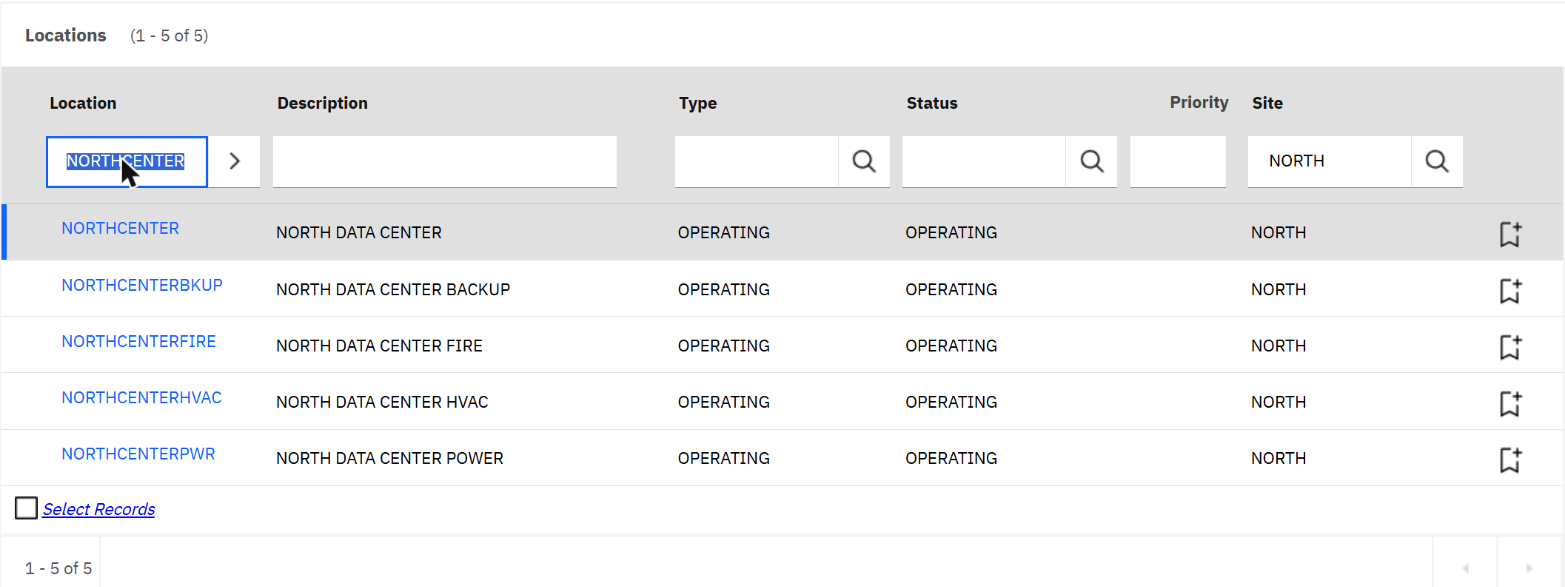
Everything starts with the site's location hierarchy. The top location is the data center itself,
NORTHCENTER. Under it sit the halls and the supporting systems, each as its own location.
The Drilldown view shows the same hierarchy as a tree in the DATACENTER system. It also links the
data center to its sister sites (Alpha and East), so a regional manager can browse every hall from one place.
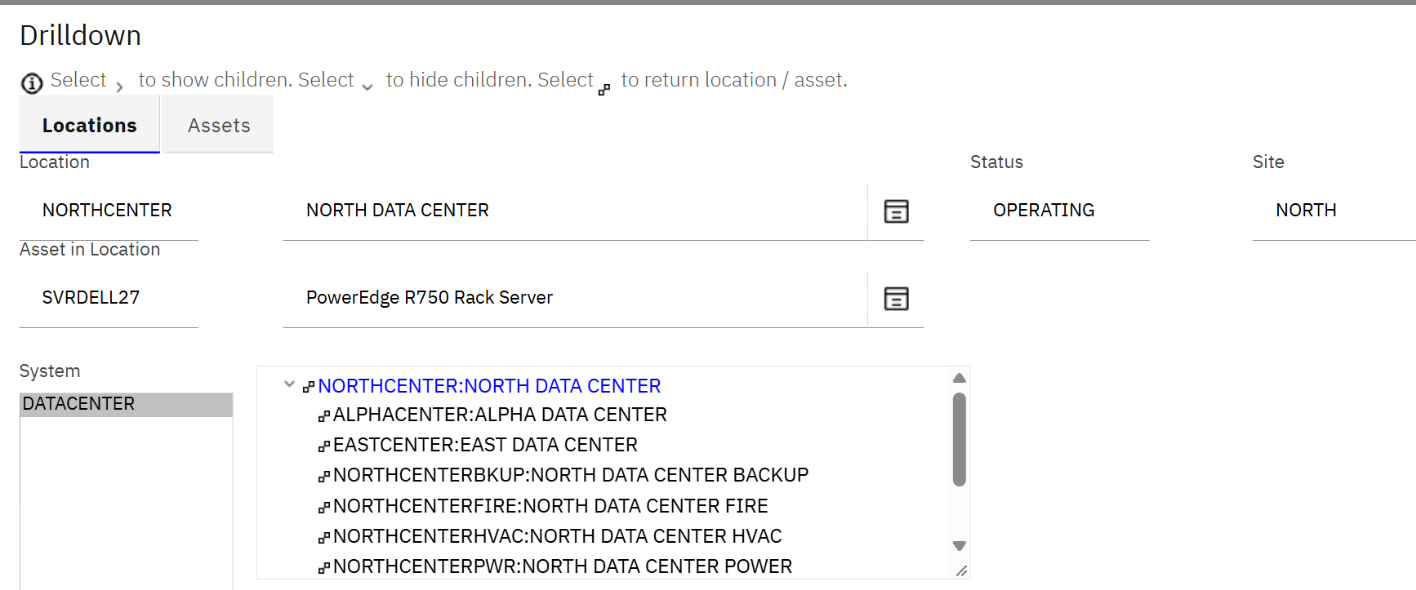
A location can belong to several systems at once. The same cooling room appears in the DATACENTER tree for the site manager and in an HVAC tree for the mechanical team. Each team browses its own view, and there is still only one record to maintain.
Chapter 2Four worlds in one asset register
The asset list for the site reads like a tour of the building. The first rows are the cooling plant: two chillers, the condenser and chilled-water pumps, three cooling towers on the roof, transfer pumps and the electric motors that drive them. The Parent column shows that the motors belong to the pumps they drive.
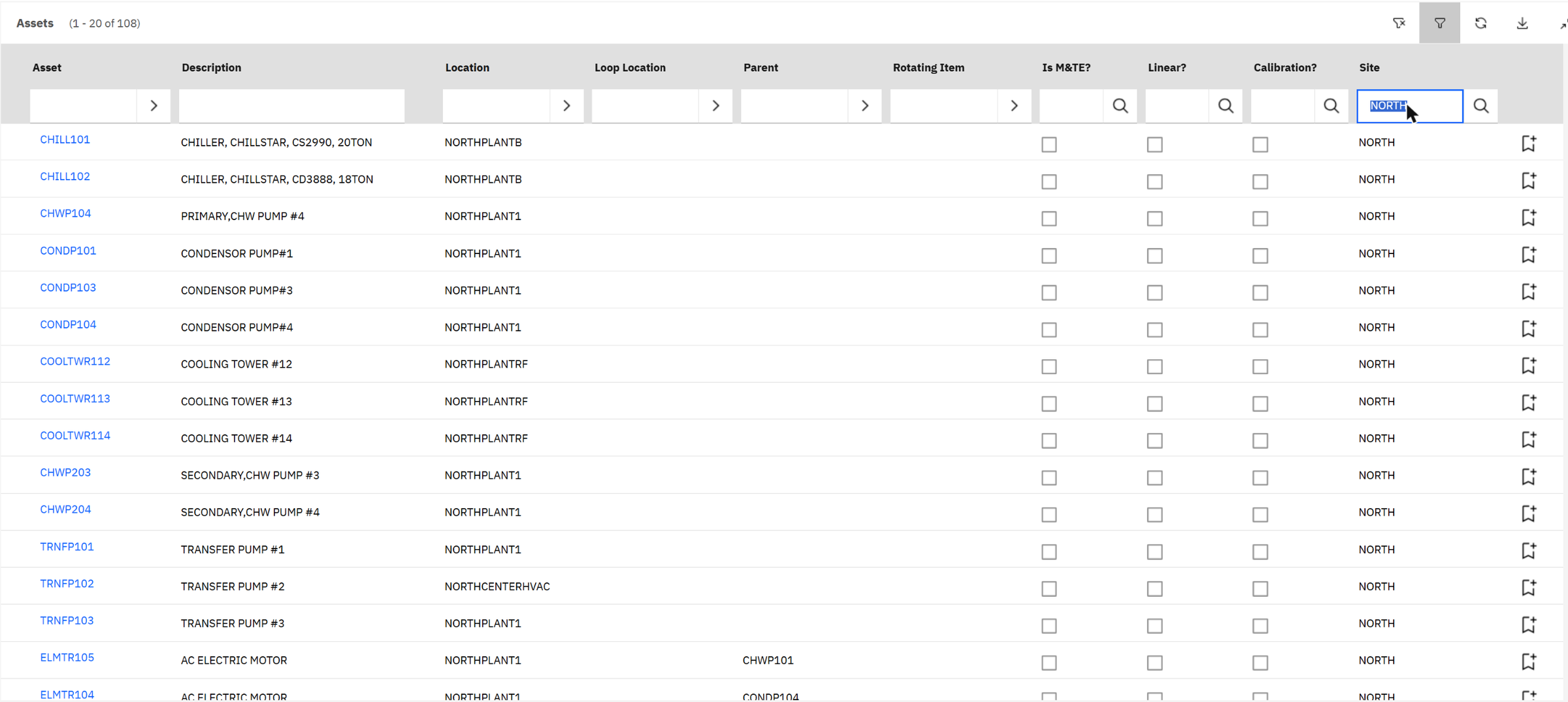
Further down the list are the other worlds. Each asset carries an asset type that says which team owns it:
Chillers, cooling towers, pumps, motors, boilers and air-cooling units.
Rack servers such as the Dell PowerEdge R750, and IT tools.
Core and access switches, routers, firewalls and radios.
PLCs and building controllers that run the cooling plant.
Open any of them and the record looks the same. Here is a Cisco 9300 switch: type TELCO, status operating,
installed in tray 5 of rack G18, with its serial number and priority. The tabs across the top (spare parts, safety, meters,
specifications, relationships, work, map) are the same ones a chiller has.
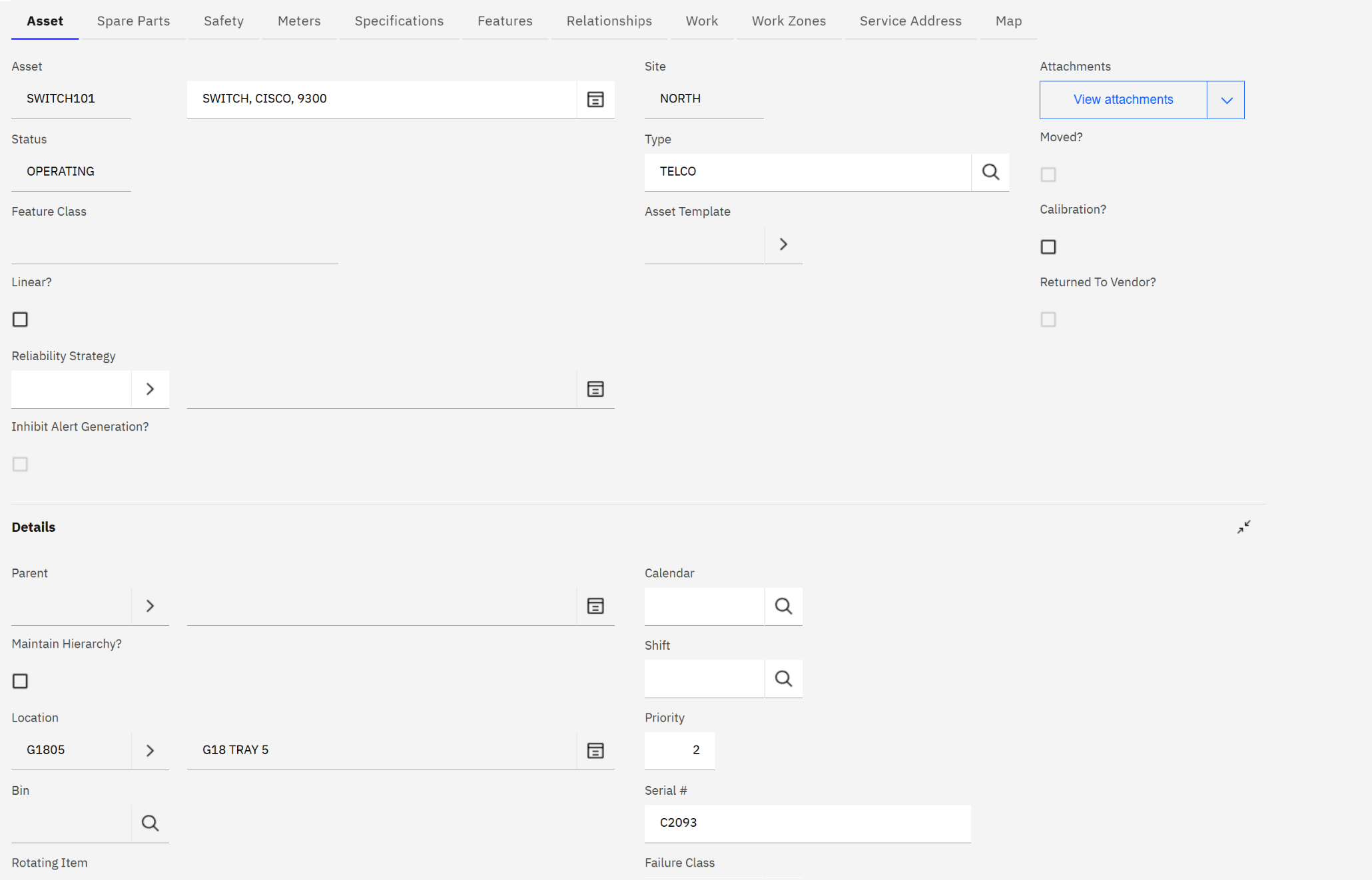
Asset type is more than a label. Classifications, job plans, PM schedules, failure codes and security groups can all be tied to it, so the network team sees network work and the facilities team sees cooling work, while reports can still roll up the whole site.
Chapter 3A request catalog built for data centers
Most data center work starts as a request: a customer wants a server racked, an engineer needs a power check, an auditor needs a change report. The demo package adds a request catalog to the Data Center Operations dashboard, grouped the way a data center team thinks.
The first group covers MACs, the moves, adds and changes that make up most of the daily workload.
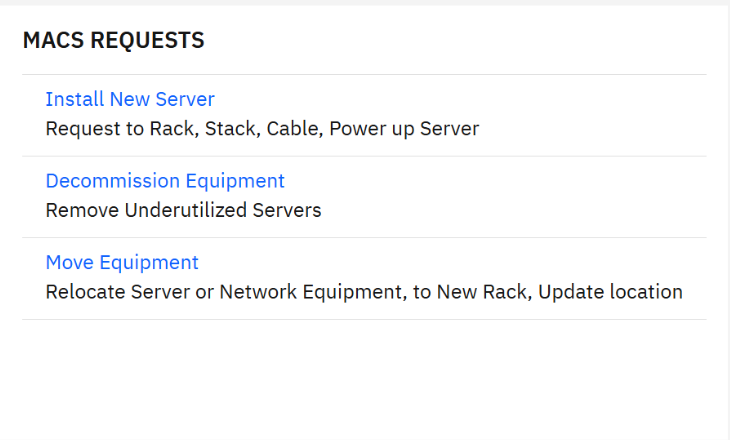
Four more groups cover the rest of the job: power and environment, capacity and planning, maintenance and troubleshooting, and security and compliance.

A Move Equipment request becomes a work order against the asset itself. When the technician finishes, the asset is moved to its new rack location in the same application (Move/Modify Assets keeps the move in the asset's history), so the register matches the floor. Installs add a new asset in a location; decommissions take one out of service and keep its history.
Notice how the categories mix the three worlds. A Power Capacity Check is facilities work done for IT; a Cooling Impact Analysis looks at cabinets, equipment and hot spots together; Data Center Access is a security process for both staff and customers. One catalog means one queue, one set of approvals and one history.
Chapter 4Health for every asset, not only the big ones
Because every device is an asset, Maximo Health can score all of them. Here is the same Cisco switch in Health and Predict: a health score of 90%, its status, priority and photo, and the button that asks watsonx for an AI summary of its condition.
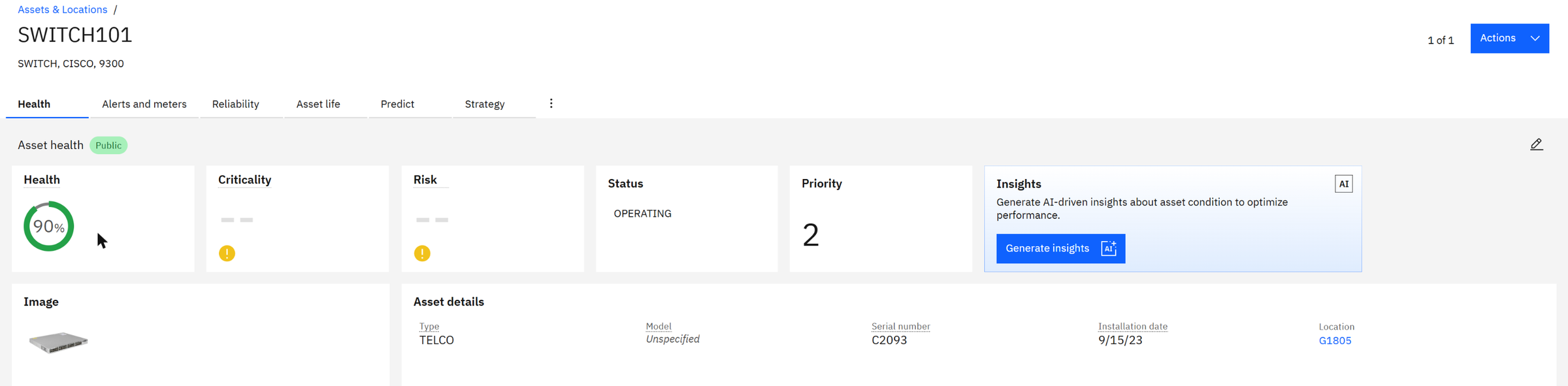
The empty criticality and risk tiles are worth a word. Health calculates them from a scoring group, a set of assets with the formulas that apply to them. The North site has none yet, so only the default health score appears. Adding one for the data center is the natural next step: criticality from the asset's priority and what it feeds (a core switch or a chiller outranks a spare server), risk from health and criticality together.
In Health and Predict, create a scoring group with a query on siteid = 'NORTH', add the default health score
plus a criticality score based on priority, and recalculate. The matrix will then show which data center assets combine poor
condition with high importance. My Health and Predict post
walks through each screen.
What it means for the businessOne place to look, one process to follow
A failed pump or controller leads straight to the location it serves and the equipment in it, without switching tools.
Installs, moves and decommissions are recorded on the asset as part of the work, not as a separate clean-up job.
Health scores and meter-based alerts on chillers and pumps flag a degrading plant before it becomes a thermal event.
One request catalog, one set of job plans and one reporting model across North, East and Alpha, so practices and costs can be compared.
For colocation providers there is one more benefit: customer requests (racking, access, remote hands) run through the same catalog, so service levels and charges come from the same records as the maintenance work.
Quick check
A chiller and a network switch are both assets. What keeps the two teams' work separate?
The asset type (FACILITIES or TELCO here), and the classifications, job plans and security groups tied to it.
Why are the switch's criticality and risk empty?
No Health scoring group covers site NORTH yet, so only the default health score is calculated.
What happens to the register when a Move Equipment request is completed?
The asset is moved to its new rack location, with the move kept in its history, so the register matches the floor.
Glossary
- Location
- A place in the hierarchy: site, hall, room, rack or tray.
- System
- A named tree of locations; one location can be in several systems.
- Asset type
- The group an asset belongs to, such as facilities, IT, telecom or OT.
- MACs
- Moves, adds and changes: the day-to-day installs, relocations and removals.
- CRAC
- Computer room air conditioner, the cooling unit inside the hall.
- PDU
- Power distribution unit, the power strip that feeds a rack.
- PLC
- Programmable logic controller, the computer that runs plant equipment.
- Scoring group
- In Maximo Health, a set of assets and the scores calculated for them.
Running data centers on separate tools? Send me a message and I'll show you this demo live.
Screens: IBM Maximo Application Suite 9 (Manage, Health and Predict), with the data center package from IBM's ALM demo toolkit. All assets and records are demo values.