IBM Maximo Real Estate and Facilities · Administration · A guide for Maximo people
The MREF Admin Console, page by page
Every MREF system has a small, old-looking console at /html/en/default/admin that tells you what the
platform is doing: which agents run where, what is queued, what failed, how much memory is left. This guide walks through every
page on a real MREF 9.2.2 system on OpenShift, explains each line, and spends extra time on the agents, the background
workers that do most of the real work.
The green In Maximo terms boxes translate each page for someone who knows Maximo Manage.
- How to open the Admin Console and who can see which page.
- How to read the Admin Summary, including the red System Status warnings.
- What each of the 16 agents does, where it runs on OpenShift, and when to worry.
- What every other page is for: caches, logs, database tasks, workflow queues, threads, Must Gather.
- Which buttons are safe to press, and which ones you should leave alone on a shared system.
Reading time: about 30 minutes. Screens: MREF 9.2.2 (platform 9.2.6) on Maximo Application Suite, Red Hat OpenShift, Db2.
There is no single Maximo application like this. The Admin Console is what you would get if you put the Cron Task Setup,
System Properties, Logging, the /maximo/webclient/utility pages and a read-only SQL window on one menu. It is a
platform tool: it shows the TRIRIGA engine underneath MREF, not your business data.
Getting inOpening the console
Sign in to MREF as an administrator, then open https://<your MREF host>/html/en/default/admin/index.jsp in the same
browser. The left menu lists the pages you are allowed to see; the right side shows the selected page.
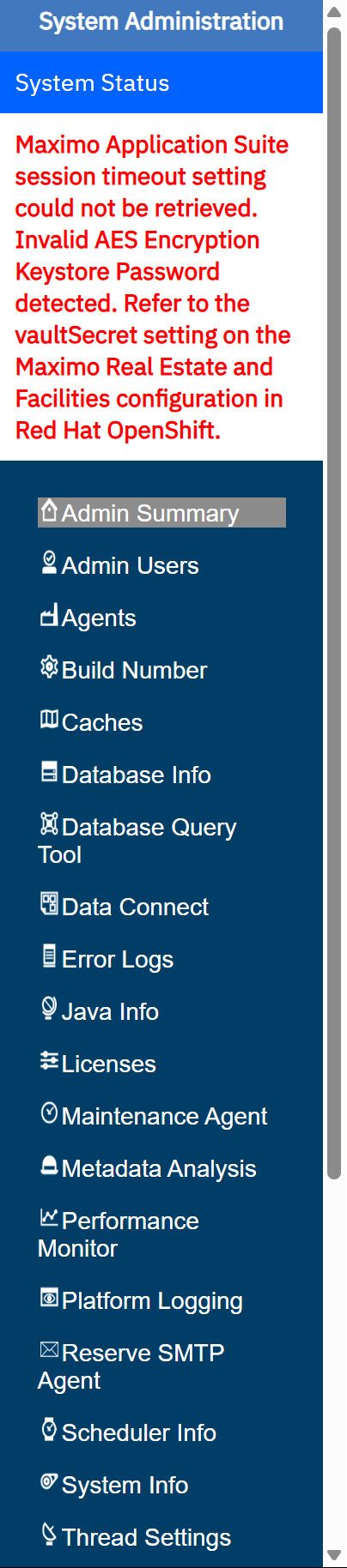
Access is per page, per user: see Admin Users below. A user with "Read Only" on a page can look but not press its buttons.
The big pictureHow MREF runs on OpenShift
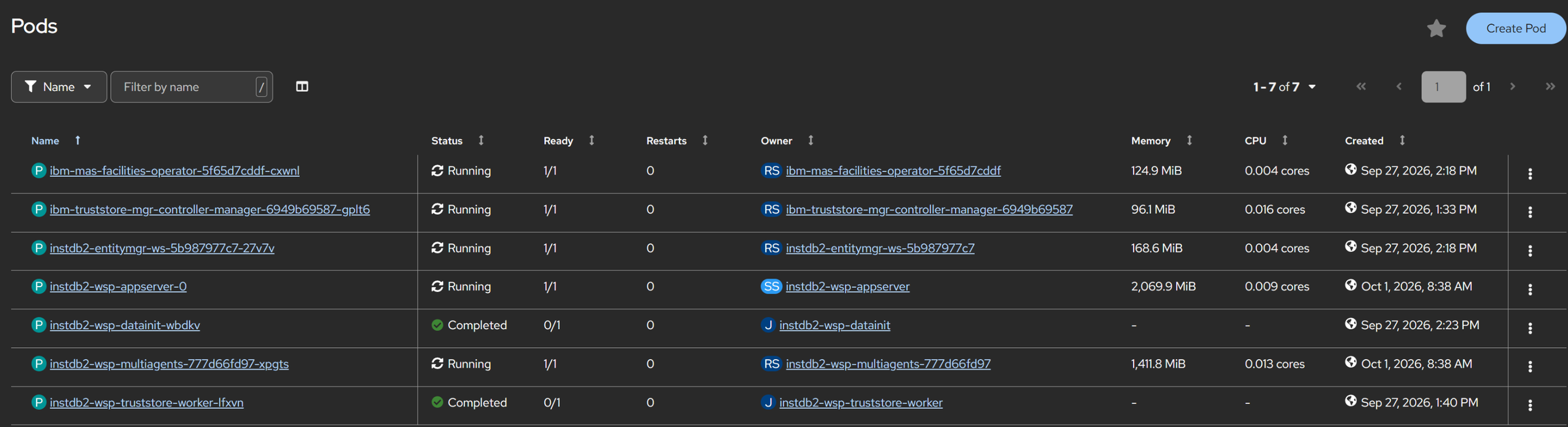
On Maximo Application Suite, MREF is not one server. The Facilities operator builds it from a custom resource (the
FacilitiesWorkspace) into several pods in its own namespace. On this system, mas-instdb2-facilities:
| Pod | What it is | Agents on it |
|---|---|---|
instdb2-wsp-appserver-0 | The UI server (Liberty). Users and the Admin Console talk to this one. Instance ID 0. | DataImportAgent only |
instdb2-wsp-multiagents-… | A second Liberty server with no users, dedicated to background work. Instance ID 3000. | All the others |
ibm-mas-facilities-operator-… | The operator: turns the FacilitiesWorkspace settings into pods, secrets and routes, and keeps them that way. | none |
instdb2-entitymgr-ws-… | MAS workspace entity manager: connects MREF to MAS users and licences. | none |
…-datainit, …-truststore-worker | One-off jobs: database setup at install, certificate truststore. "Completed" is normal. | none |
So when the Admin Console says an agent is "Running On instdb2-wsp-multiagents-3000", it means the multiagents pod. Its log
(/home/wiotp/log/server.log inside that pod, or the pod's Logs tab in OpenShift) is where that agent's errors go, not the
Error Logs page of the UI server.
The operator rebuilds the pods from its configuration. Agent placement, thread counts and the TRIRIGA properties come from the
FacilitiesWorkspace custom resource and the secrets it points to (here wsp-facilities-fp--sn holds
FACILITIES.properties, wsp-facilities-vs--sn is the vault secret). A value changed only inside a running pod is
lost when the pod restarts. The console says so itself: Thread Settings shows "(will not save)".
Both pods here run with a 6 GiB memory limit and 2 CPU limit; the workspace size is "small".
This is the same split you know from Manage: UI pods and separate cron/MIF/report "server bundles". The multiagents pod is MREF's cron bundle. And just like Manage on MAS, you change the configuration through the custom resource, not by editing files inside a pod.
Page 1Admin Summary and the red warnings
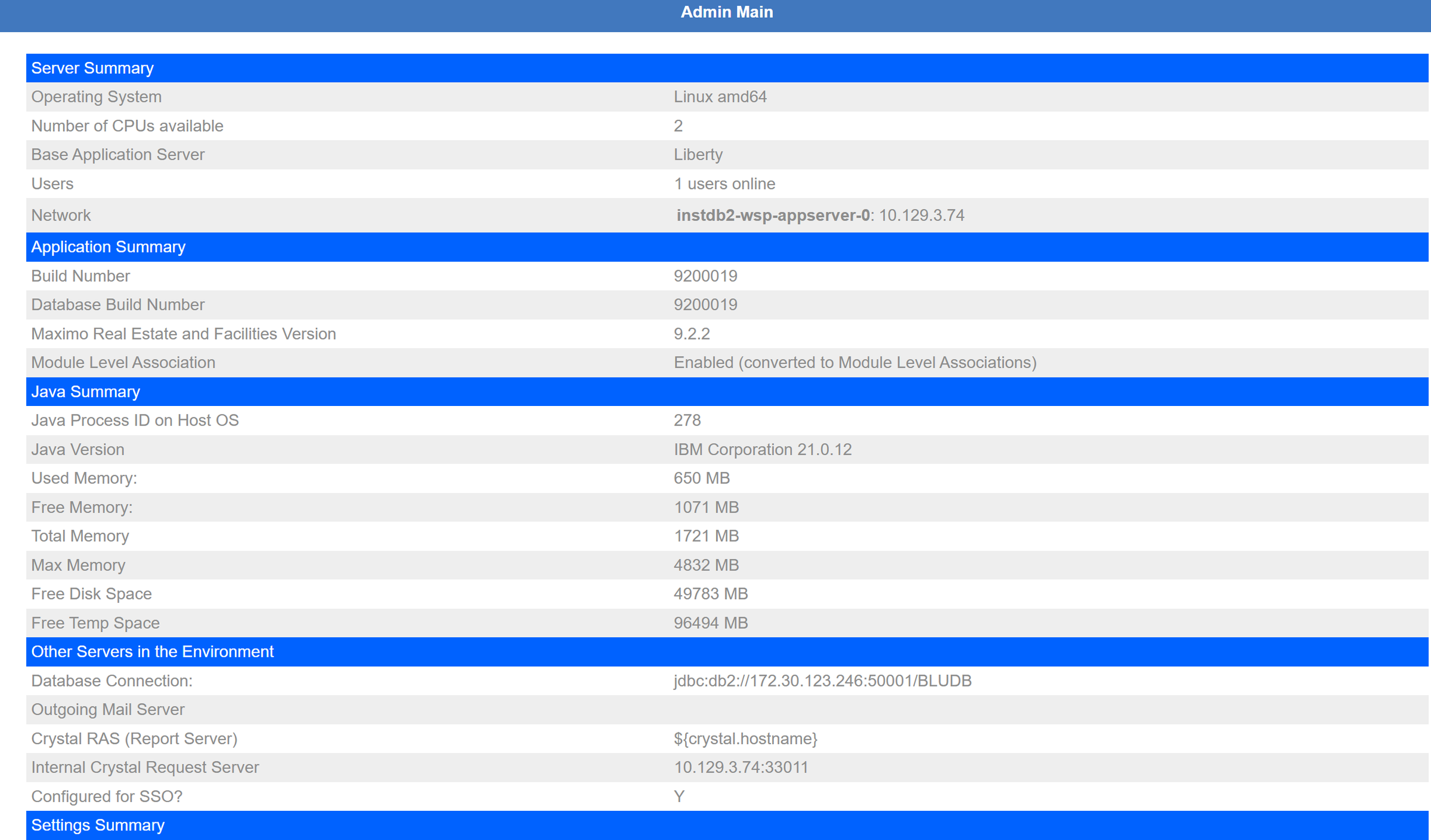
| Line | Value here | What it means |
|---|---|---|
| Operating System, CPUs | Linux amd64, 2 | What the container sees: the pod's CPU limit, not the size of the OpenShift node. |
| Base Application Server | Liberty | WebSphere Liberty, as for Manage. |
| Users | 1 users online | Sessions on this server. Details: Users Logged In. |
| Network | instdb2-wsp-appserver-0: 10.129.3.74 | The pod name and its internal IP. It changes when the pod is recreated. |
| Build Number, Database Build Number | 9200019, 9200019 | Code and database must match. A mismatch after an upgrade means the database upgrade did not finish. |
| MREF Version | 9.2.2 | Application version (the platform underneath is 9.2.6, see Build Number). |
| Module Level Association | Enabled (converted…) | Associations are stored per module. Matters when you create new modules (see our first guide). |
| Java Process ID, Java Version | 278, IBM 21.0.12 | The JVM inside the pod. |
| Used / Free / Total / Max Memory | ~0.9 GB / ~0.8 / 1.7 / 4.8 GB | Java heap. Total grows towards Max as needed. Watch Used against Max, not against Total. |
| Free Disk / Temp Space | ~49 GB / ~96 GB | Disk seen by the pod (log and user-file volumes). |
| Database Connection | jdbc:db2://…:50001/BLUDB | The JDBC URL from the MAS JDBC configuration. Port 50001 is Db2 over TLS. |
| Outgoing Mail Server | empty | No SMTP configured, so workflow notification e-mails cannot be sent. |
| Crystal RAS, Internal Crystal Request Server | ${crystal.hostname}, 10.129.3.74:33011 | Legacy Crystal Reports server. The placeholder means it is not configured; BIRT is the report engine in use. |
| Configured for SSO | Y | Sign-in goes through MAS (OIDC), not a TRIRIGA password. |
| Base Currency, Portal refresh | US Dollars, 60 | System-wide settings. |
The red System Status text
The two messages above the menu on this system:
- "Maximo Application Suite session timeout setting could not be retrieved." MREF asks MAS for the session timeout so both log users out at the same time. The server log shows the call is refused (HTTP 401). Users can still work; MREF falls back to its own timeout (System Info → User Session Timeout, 30 minutes here). Worth fixing so sessions behave consistently.
- "Invalid AES Encryption Keystore Password detected. Refer to the vaultSecret setting…" MREF encrypts some stored values
with an AES key kept in a keystore. Its password comes from the vault secret named in the FacilitiesWorkspace
(
vaultSecret). The warning means that password does not open the keystore. Fix it in OpenShift, by correcting the secret, never by editing anything in the console. Until then, features that rely on encrypted values may fail.
Like the Manage "System Health" warnings, or a mxe.security.crypto.key mismatch after
moving a database: the system runs, but anything that needs to decrypt stored secrets will not.
The heart of itAgents, the background workers
An agent is a background process inside a Liberty server that wakes up regularly, looks for queued work in the database, and does it. Almost everything that is not a user clicking a button is done by an agent: asynchronous workflows, scheduled events, imports, publishing, cleanup.
| Agent | What it does | Maximo equivalent | Here |
|---|---|---|---|
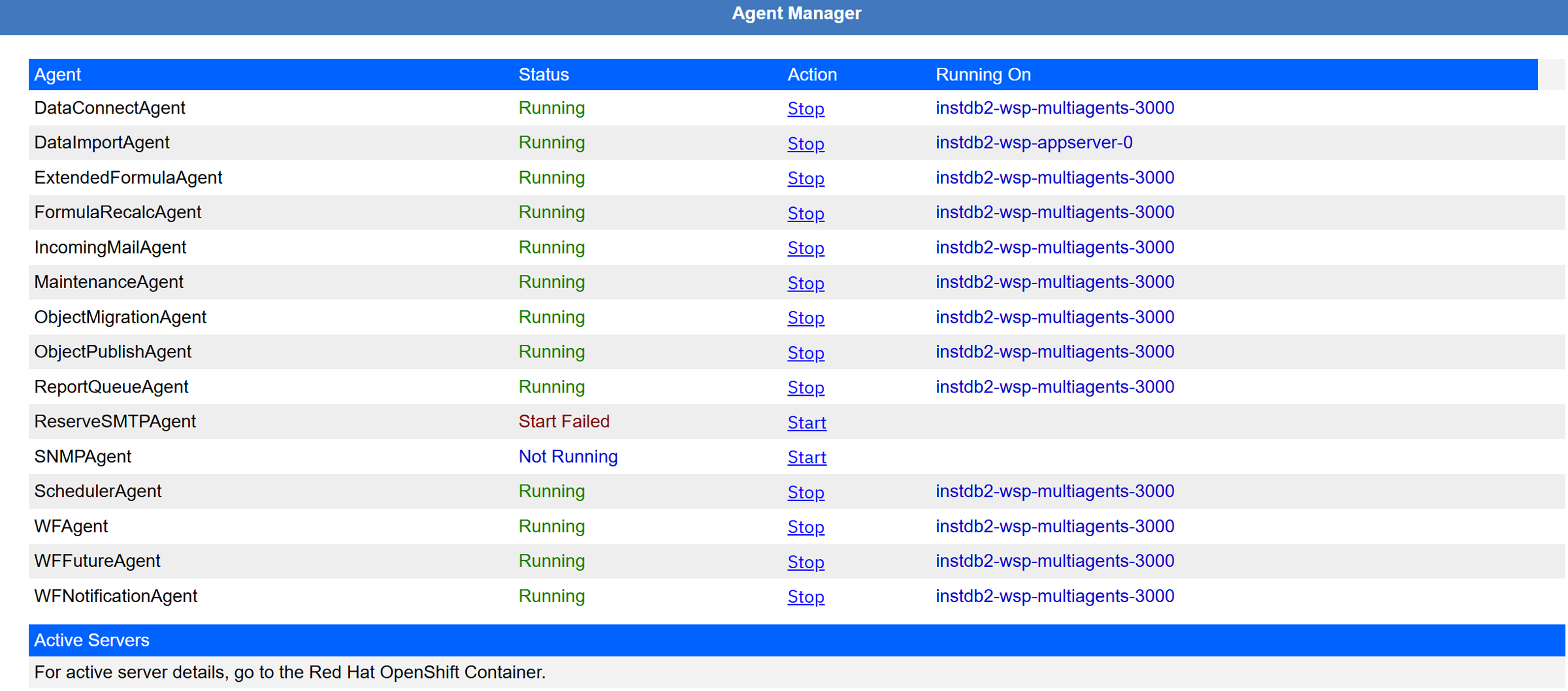
| WFAgent | Runs asynchronous workflows: picks events from the workflow queue (WF_EVENT) and executes them. The most important agent. | Workflow and automation scripts run by a cron task | Running, multiagents |
| WFFutureAgent | Holds workflow actions dated in the future (WF_EVENT_FUTURE) and posts them to the queue when their time comes. | Escalation with a time condition | Running |
| WFNotificationAgent | Sends workflow notifications (e-mail and in-app). | Communication templates / e-mail send | Running (no SMTP configured) |
| SchedulerAgent | Fires scheduled events and recurring tasks: preventive maintenance schedules, job scheduler, recurring jobs. | PM generation cron task, Cron Task Setup | Running |
| ReportQueueAgent | Runs reports that were queued or scheduled instead of run on screen. | Report scheduling / report queue | Running |
| DataImportAgent | Processes Data Integrator uploads (tab-delimited files loaded through the UI). | Data import (MIF flat file), MXLoader | Running, appserver |
| DataConnectAgent | Moves rows from staging tables into business objects (DataConnect integration). | MIF interface tables | Running |
| ObjectPublishAgent | Publishes business objects after a Data Modeler change: alters tables, regenerates metadata. | Apply Configuration Changes (ConfigDB) | Running |
| ObjectMigrationAgent | Imports and exports Object Migration packages. | Migration Manager deploy | Running |
| FormulaRecalcAgent | Recalculates formula fields for many records, for example after a formula changes. | No direct one (bulk formula refresh) | Running |
| ExtendedFormulaAgent | Recalculates "extended formulas" that depend on other records, from a queue. | No direct one | Running |
| MaintenanceAgent | The cleanup agent: removes old workflow instances and stale records, runs database maintenance on a schedule. | Housekeeping cron tasks | Running |
| IncomingMailAgent | Reads an inbound mailbox and turns mails into records or workflow events. | Email Listener | Running |
| ReserveSMTPAgent | Receives meeting-room booking mail for the Reserve (room booking) feature. | None | Start Failed |
| SNMPAgent | Answers SNMP monitoring queries. | None | Not Running |
Reading the statuses
- Running with a server name: normal.
- Not Running: not started. Fine for agents you do not use (SNMP here).
- Start Failed: something tried to start it and it could not. Here the Reserve SMTP agent is switched on for the
multiagents pod but Reserve mail is not configured (its domain is still the sample
reserve.tririga.qa.tririga.com). Harmless if you do not use Reserve; otherwise fix the configuration.
Where an agent runs, and why
On OpenShift the multiagents pod is started with agent switches such as WF_AGENT=enabled,
SCHEDULER_AGENT=enabled, MAINTENANCE_AGENT=enabled and RESERVE_SMTP_AGENT=enabled; the operator sets
them from the FacilitiesWorkspace (agentsSpecs, empty here, means "use the defaults"). Each Liberty server has an instance
ID (0 for the appserver, 3000 for multiagents), which is the number you see after the pod name.
The Stop link really stops that agent across the system. Stop the WFAgent and every asynchronous workflow queues up and nothing happens until someone starts it again; stop the ObjectPublishAgent and every Publish waits. On a shared system, do not use these links to "see what happens". If an agent is stuck, restarting its pod from OpenShift is usually cleaner.
Agents are cron task instances, and Stop/Start is the Active flag. The difference: an MREF agent is a long-running worker that polls its queue, not a task that fires on a fixed schedule.
Tuning the agentsPages that configure agents
Thread Settings
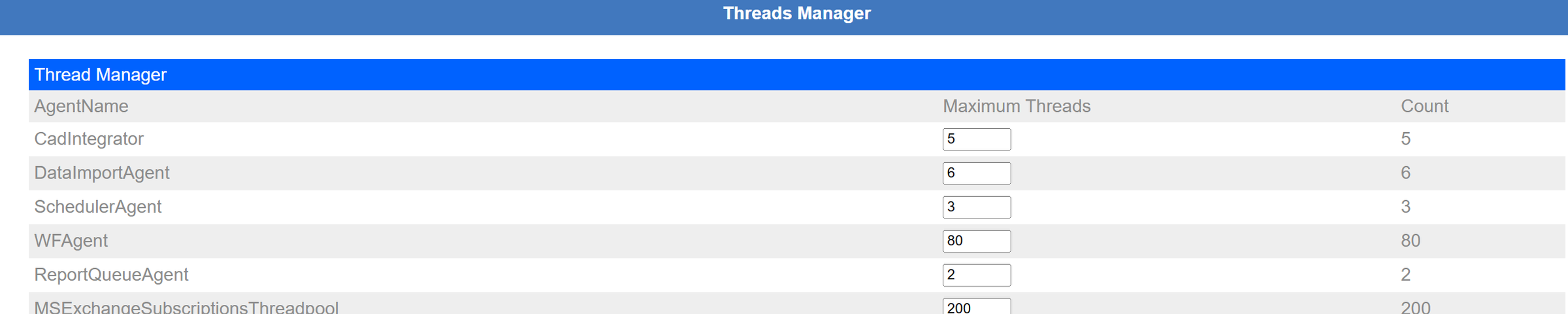
How many things each agent may do at once. More WFAgent threads means more workflows in parallel, but also more database
connections and memory. These values come from FACILITIES.properties (WFAgentMaxThreads=80 and so on); on MAS, change
them there, not here.
Workflow Agent Info
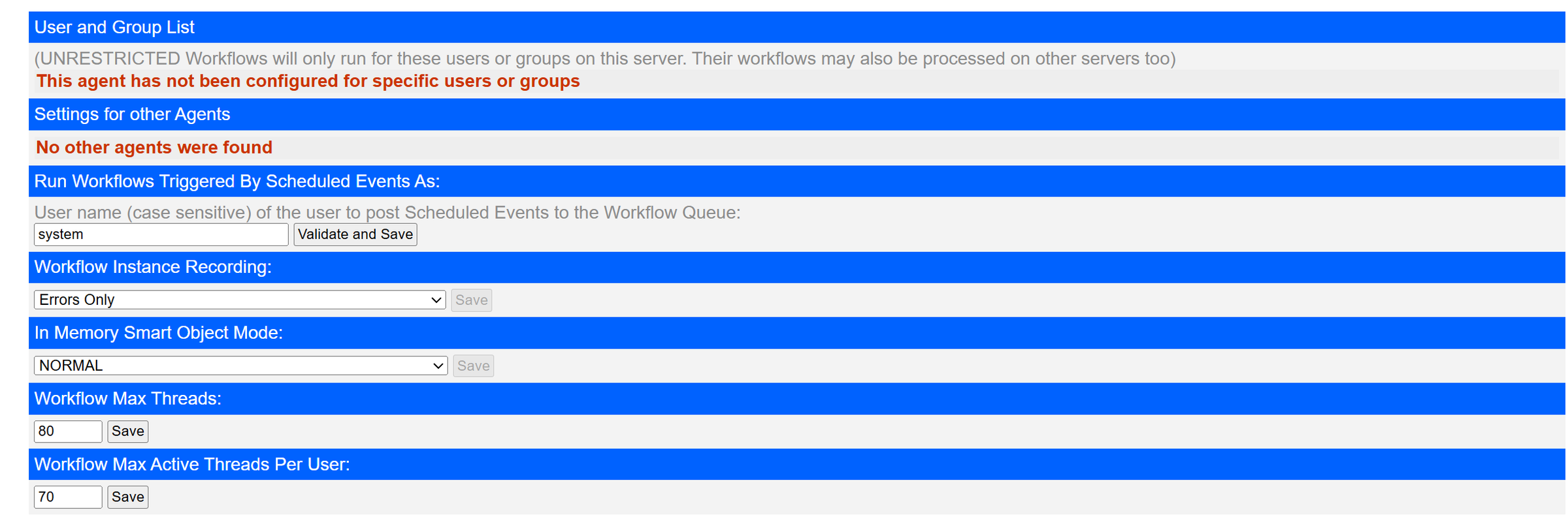
- User and Group List: you can dedicate a workflow agent to certain users (for example, a heavy integration user). Not used here.
- Run Workflows Triggered By Scheduled Events As: the user that scheduled workflows run as (
system). - Workflow Instance Recording: Errors Only: instances are kept only for failed workflows. Switch to "All" briefly when you debug a new workflow, then back: recording everything fills the database.
- Workflow Max Threads 80, Max Active Threads Per User 70: the per-user limit stops one user (or one integration) from taking every thread.
Scheduler Info

A recurring schedule with no end date would create endless events, so the scheduler only creates the next 100 daily or weekly, 50 monthly or 10 yearly occurrences, and tops them up later.
Maintenance Agent
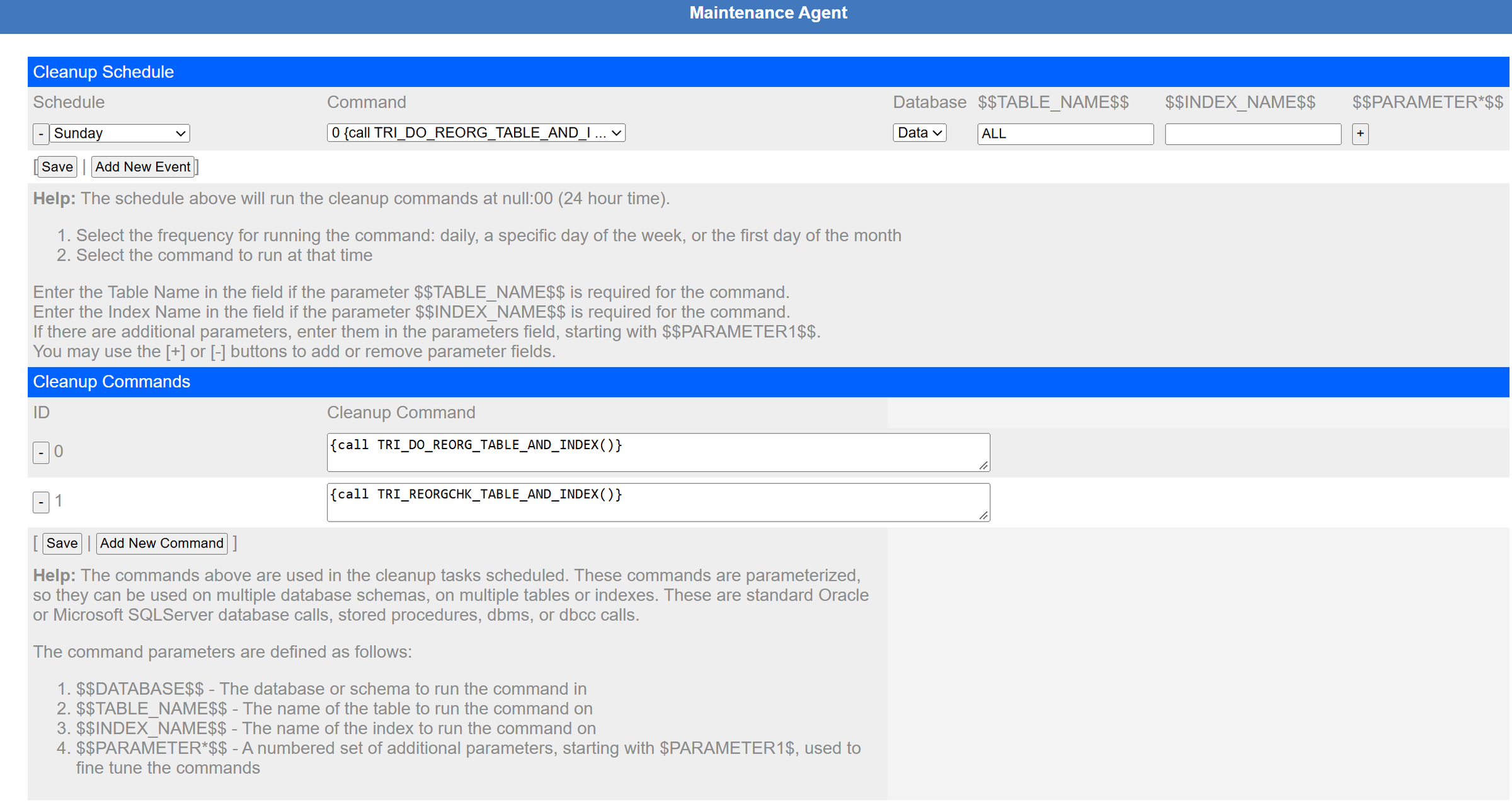
A small scheduler for database housekeeping: here Db2 table and index reorganisation (TRI_DO_REORG_TABLE_AND_INDEX) every
Sunday. The cleanup itself (old workflow instances, stale records) runs daily at CLEAN_HOUR from FACILITIES.properties
(0 here, midnight UTC). Agree this with your DBA: on MAS the database is often managed separately.
Reserve SMTP Agent

Watching the workWorkflow Events, Workflows Executing, Performance Monitor
These are the pages to open when "a workflow did not run" or "the system is slow".
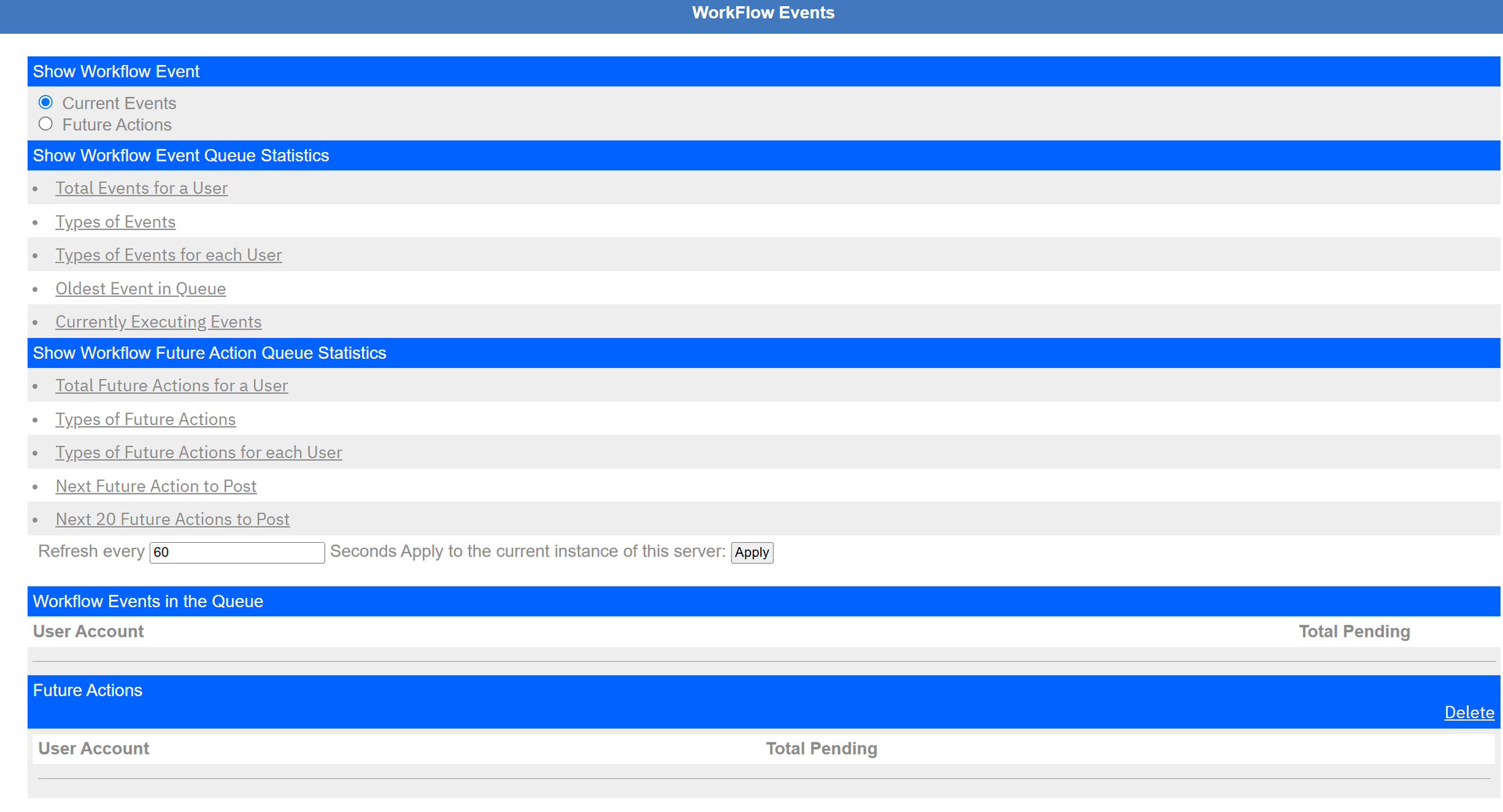
- Workflow Events in the Queue: pending events per user. Empty is good. A number that only grows means the WFAgent is stopped, overloaded or failing.
- Oldest Event in Queue: how far behind the agent is.
- Future Actions: actions waiting for a date (WFFutureAgent).

A workflow that never finishes (a loop, a lock) shows here with its current step and run time. Stop it here rather than restarting the server.
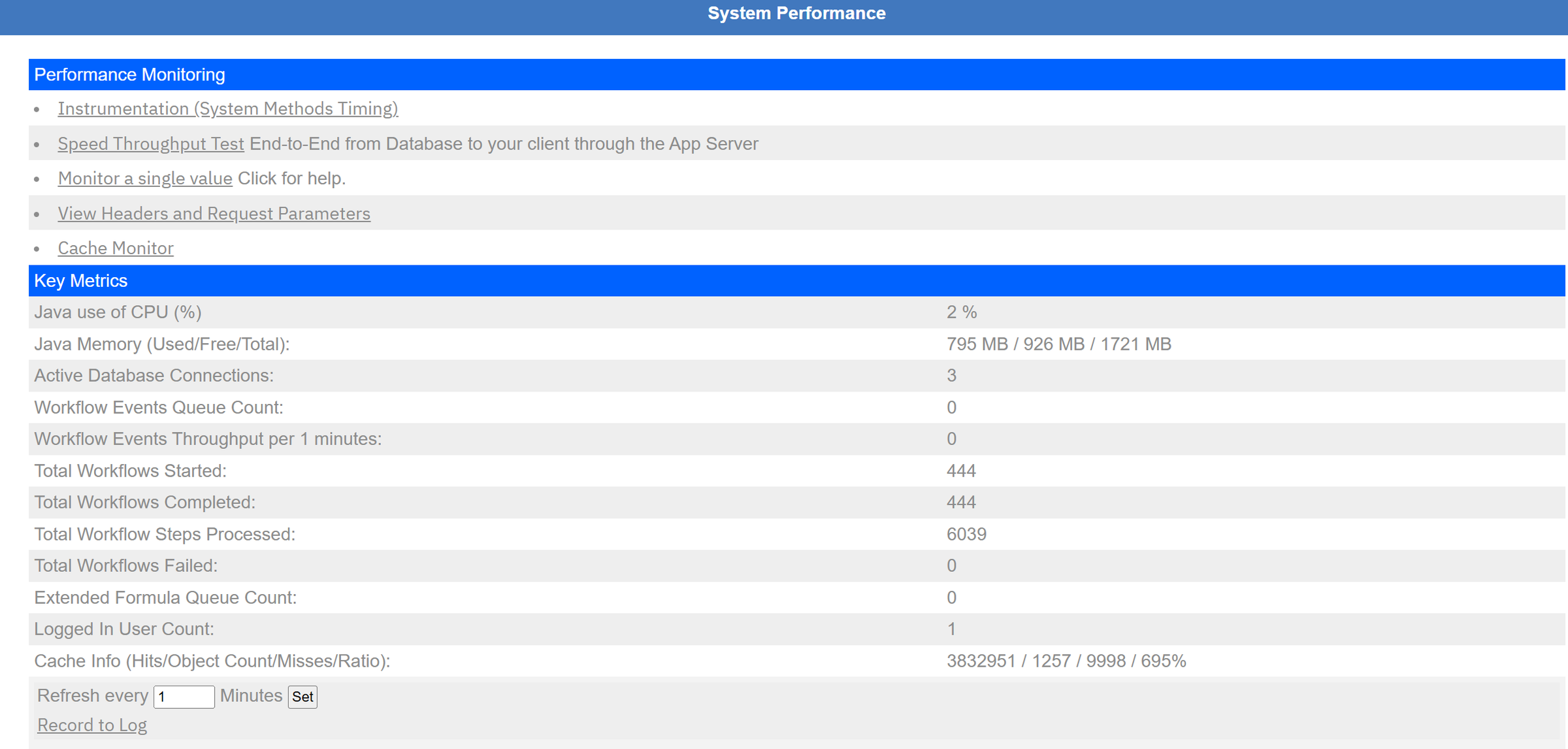
The quickest health check: CPU, heap, open database connections, workflow queue count and throughput, workflows started, completed and failed (since the server started), extended formula queue and logged-in users. "Record to Log" writes the numbers to the log, handy before and after a load test.
Workflow Events is the closest thing to watching the cron task history and the MIF queues; Performance Monitor is a mini version of the MAS monitoring dashboards, from inside the application.
DataDatabase Info, Database Query Tool, Data Connect, Caches
Database Info
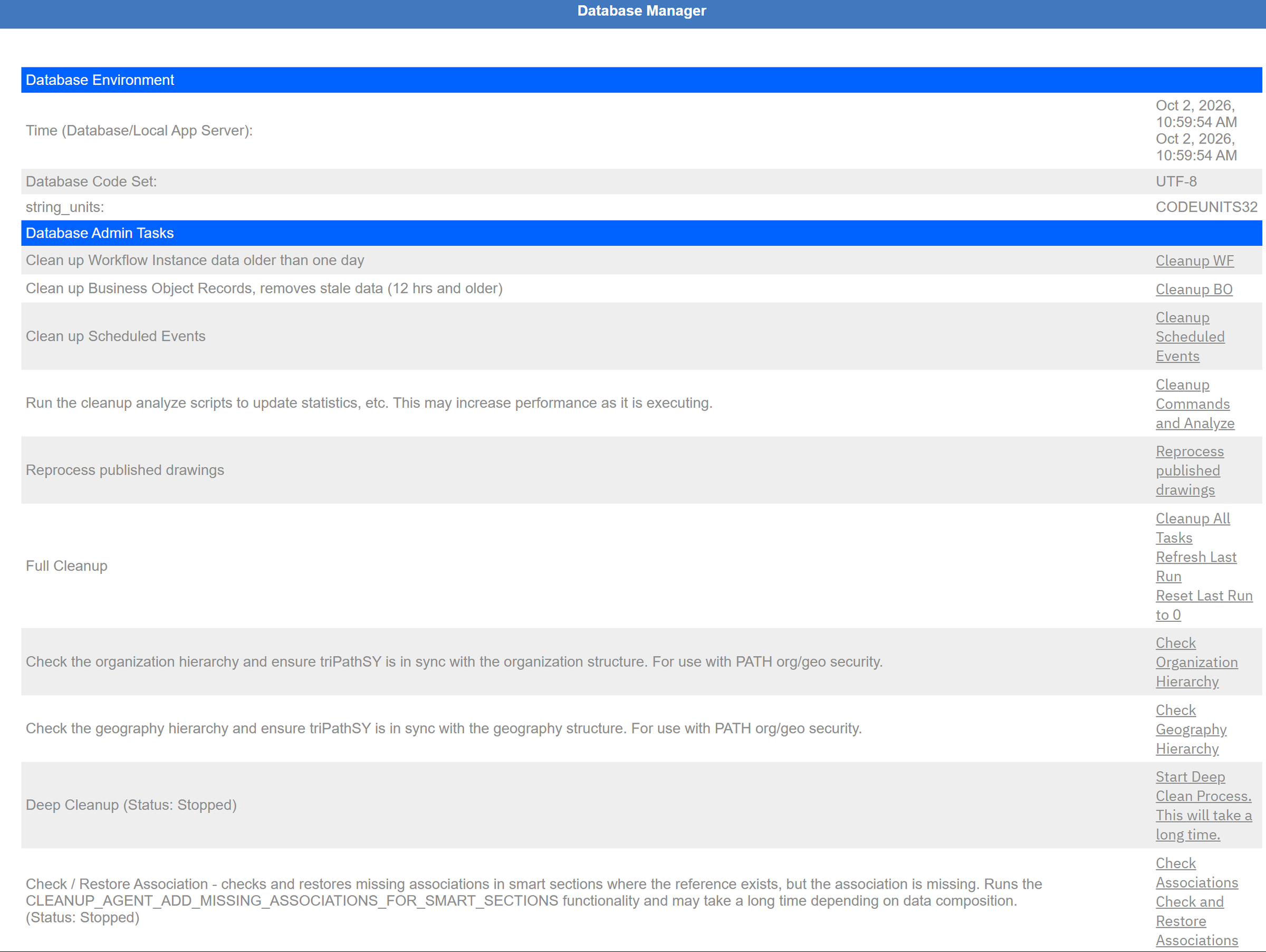
The top checks that the database and server clocks agree, and that the database is UTF-8 (CODEUNITS32 on Db2). The Database Admin Tasks run the cleanup jobs now instead of at night: clean up workflow instances, stale records, scheduled events, re-analyse statistics, check the organisation and geography hierarchies, deep cleanup, check and restore associations. They change data and can run for a long time: use them on purpose, outside business hours, with a recent backup.
Database Query Tool
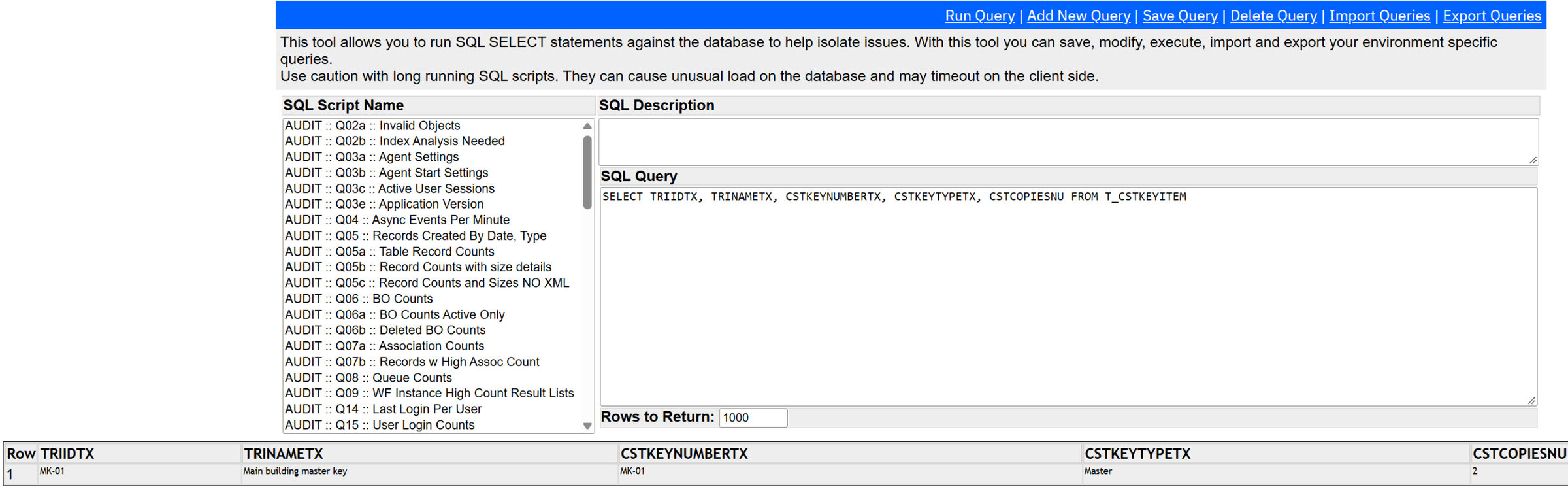
Runs SELECT statements only. The list on the left is a library of ready-made audit queries (agent settings, record counts, workflow
queue counts, logins). It is the fastest way to answer "did the workflow run?" (WF_EVENT_HISTORY) or "what is in this
record?" (the T_<BO> table).
Data Connect

When an external system writes rows into staging tables, DataConnect turns them into records in batches ("jobs"). This page shows each job's state and lets you retry or fail it. Empty here: no DataConnect integration is running.
Caches
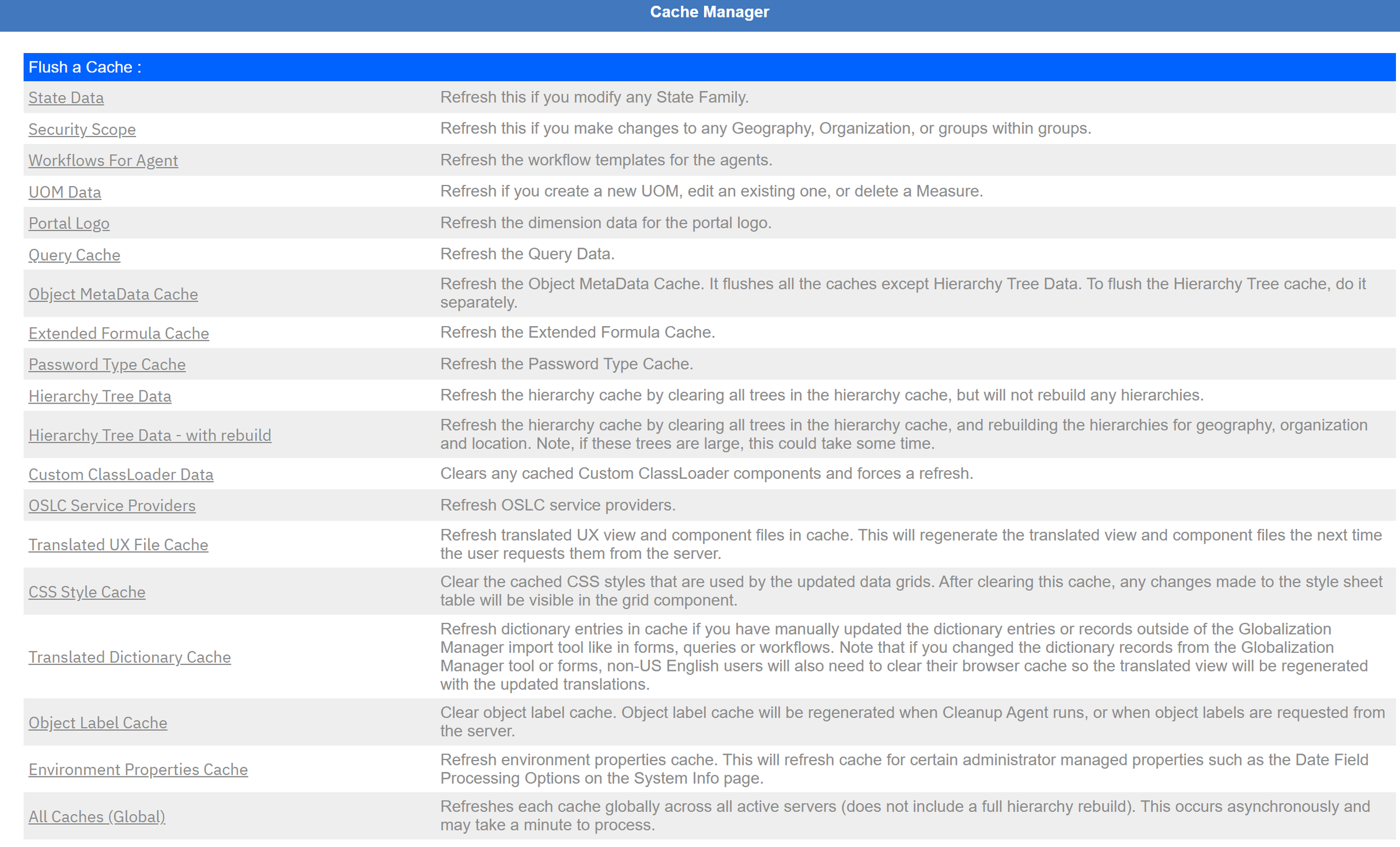
MREF keeps metadata in memory for speed. When a change does not show up, flush the matching cache rather than restarting: Workflows For Agent after publishing a workflow the agent does not pick up, Security Scope after organisation or group changes, Query Cache after query changes, Object MetaData Cache after Data Modeler work. All Caches (Global) flushes everything on every server; it is safe but makes the next minutes slower for everyone.
The equivalent of the "refresh" actions you trigger after changing System Properties, security groups or domains, collected on one page.
DiagnosticsError Logs, Platform Logging, Metadata Analysis, Java Info, Must Gather
Error Logs
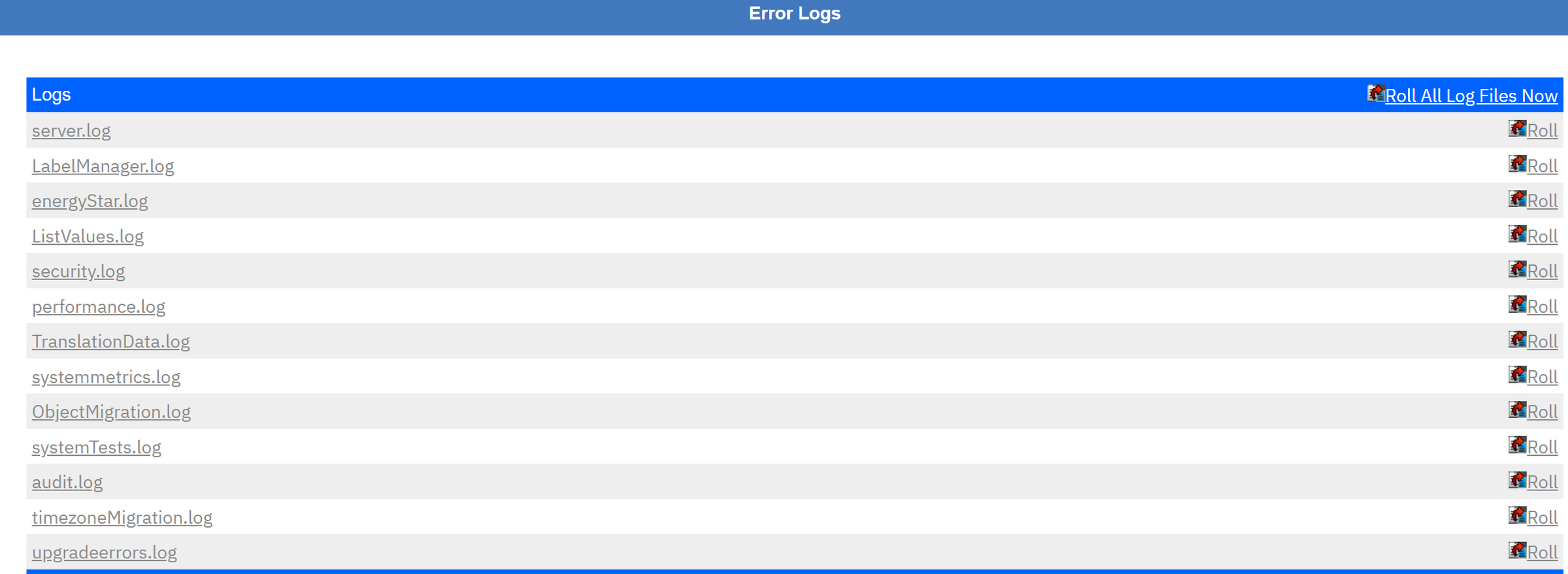
Click a log to read it, "Roll" to start a fresh file. server.log is the main one. Remember it is the log of the
UI server; agent errors are in the multiagents pod's log.
Platform Logging
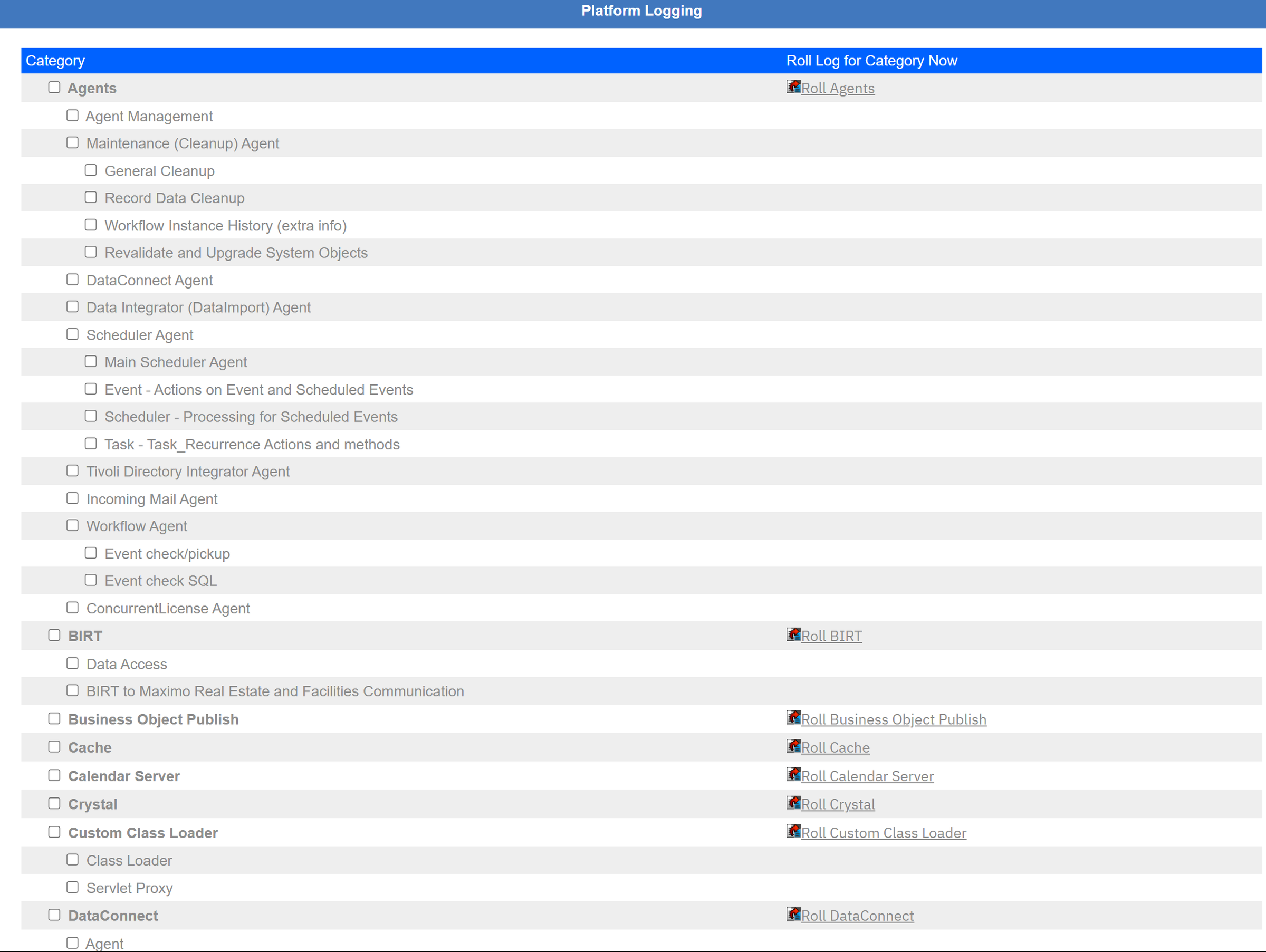
Tick a category to add DEBUG output for it to the log: for example Workflow Agent → Event check/pickup when workflows do not start. Untick it when you are done: debug logging is large and slows the server.
The Logging application: per-logger levels, applied immediately.
Metadata Analysis
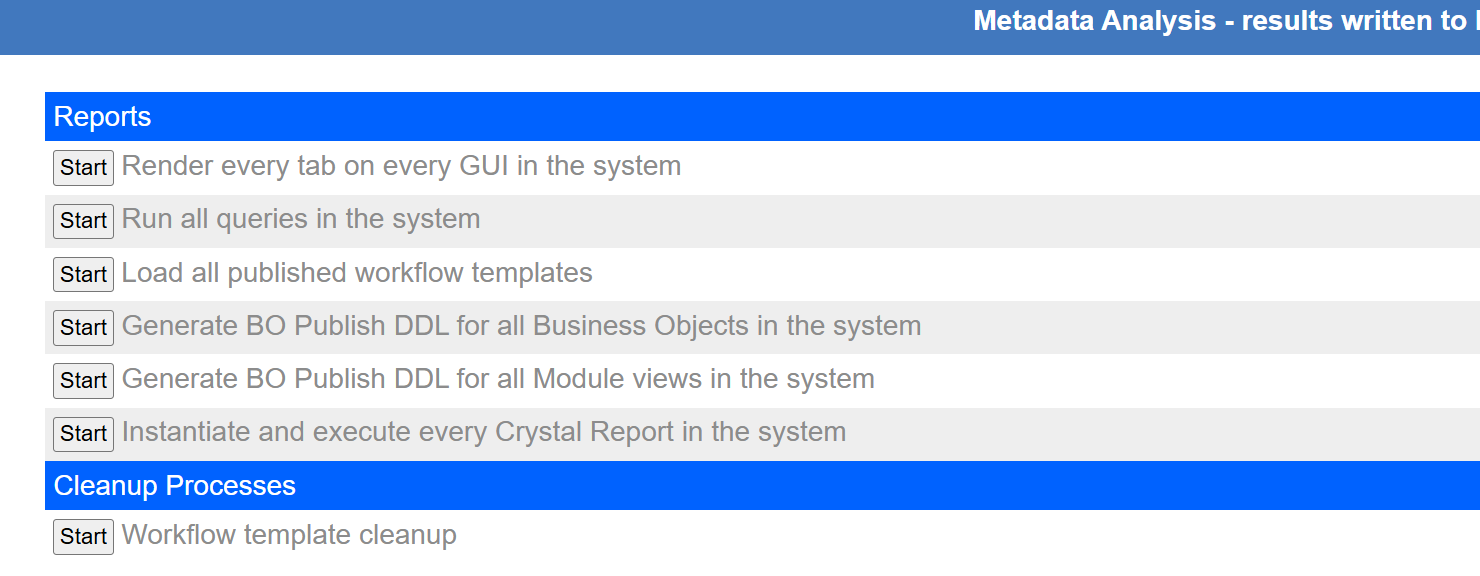
Renders every form, runs every query, loads every workflow, generates publish DDL. Useful after an upgrade or a big migration to find broken metadata. Each one is heavy: run it on a test system or at night.
Java Info
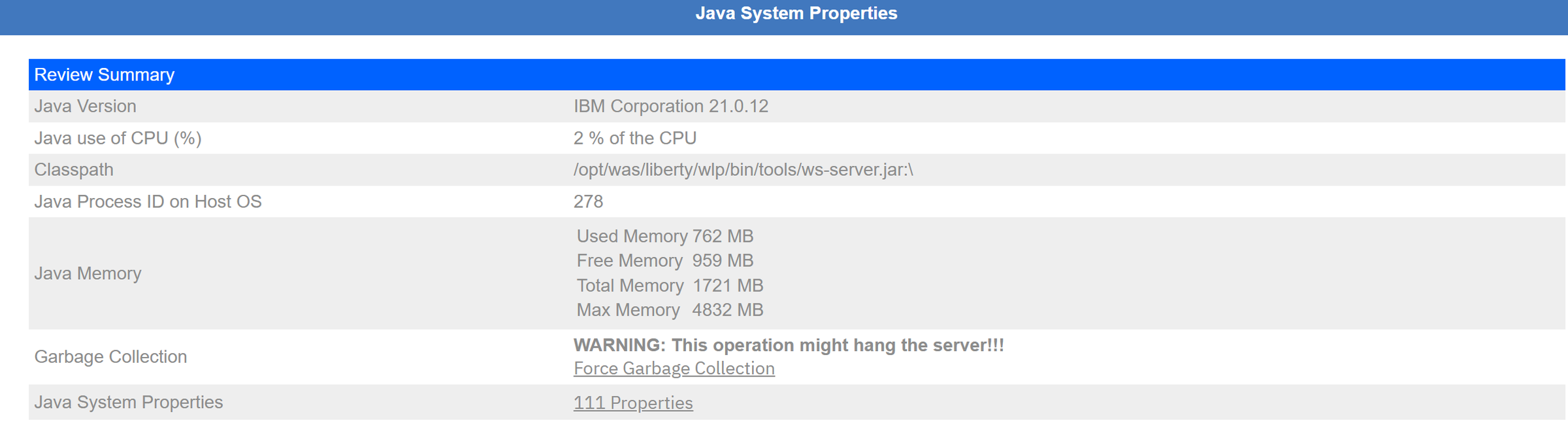
Note the warning on Force Garbage Collection: it can pause the server. Leave it alone.
Must Gather Tool
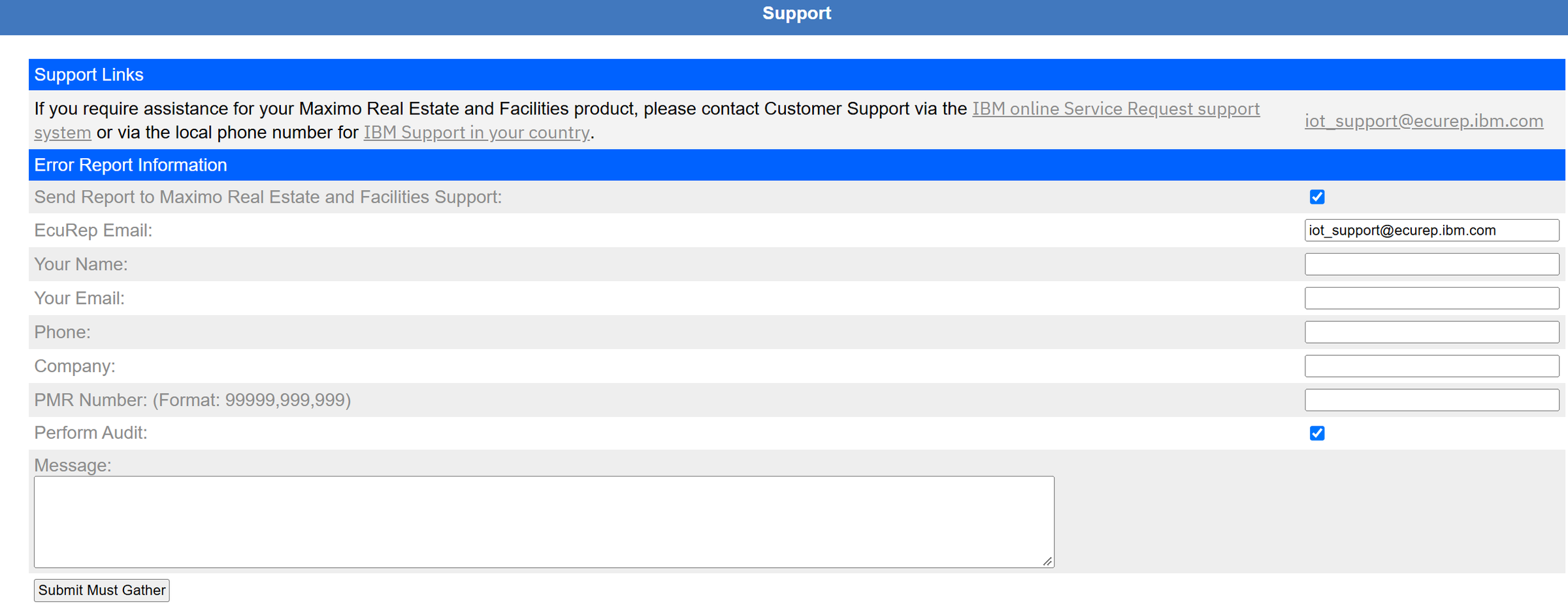
Use it when IBM Support asks for it. On MAS, also collect the OpenShift side (the MAS must-gather) so support sees the pods too.
SystemSystem Info, Build Number, Licenses, Admin Users, Users Logged In
System Info
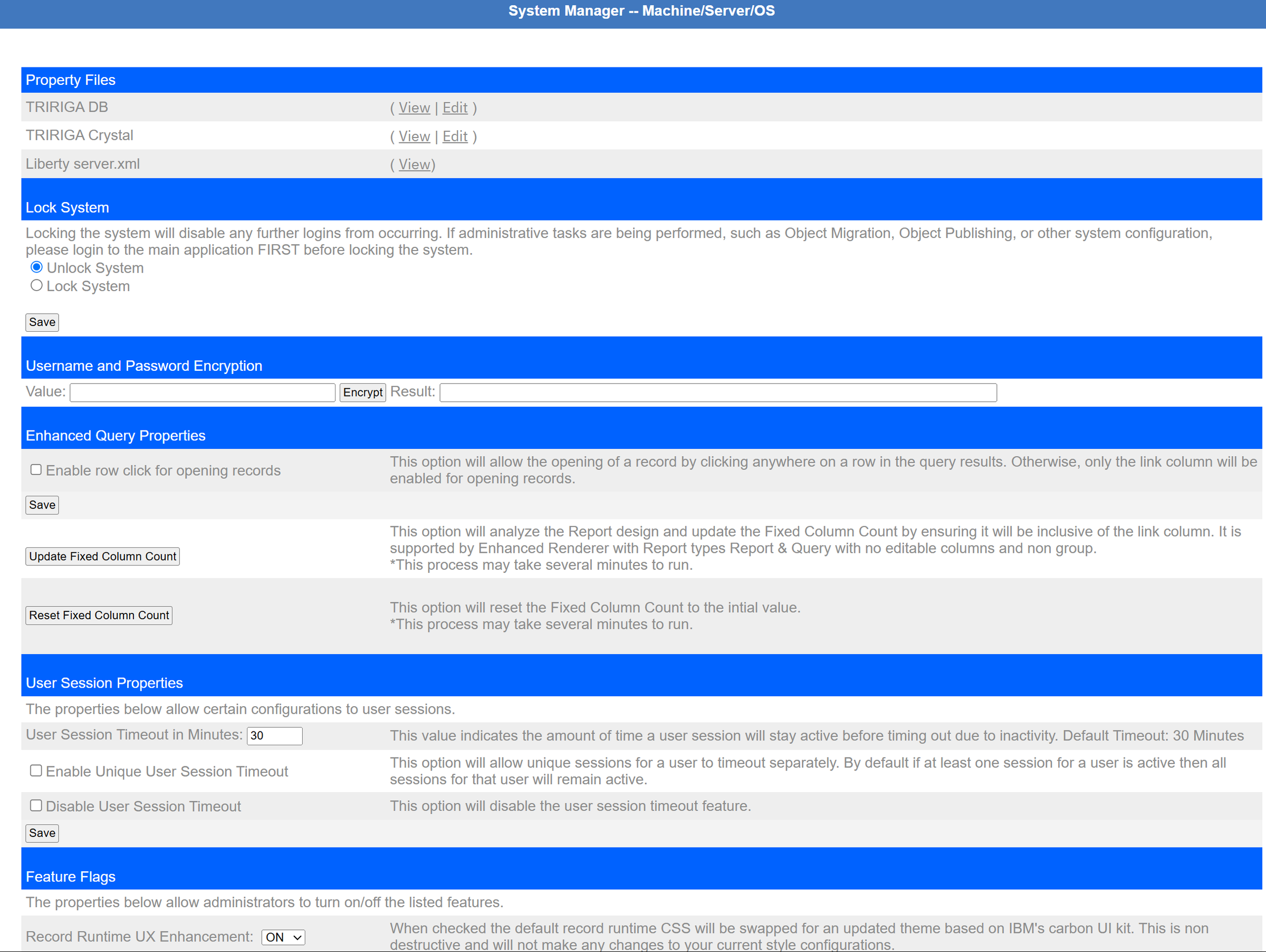
- Property Files: view the TRIRIGA properties and Liberty
server.xmlof this pod. On MAS, edit them through the FacilitiesWorkspace secrets, not here. - Lock System: blocks new logins, for example during an Object Migration. Sign in to the application first, or you lock yourself out.
- Username and Password Encryption: encrypts a value for use in a properties file.
- User Session Timeout: 30 minutes here (the fallback while MAS's value cannot be read).
- Feature Flags: switches for newer behaviour, such as the Carbon-style record pages.
Build Number
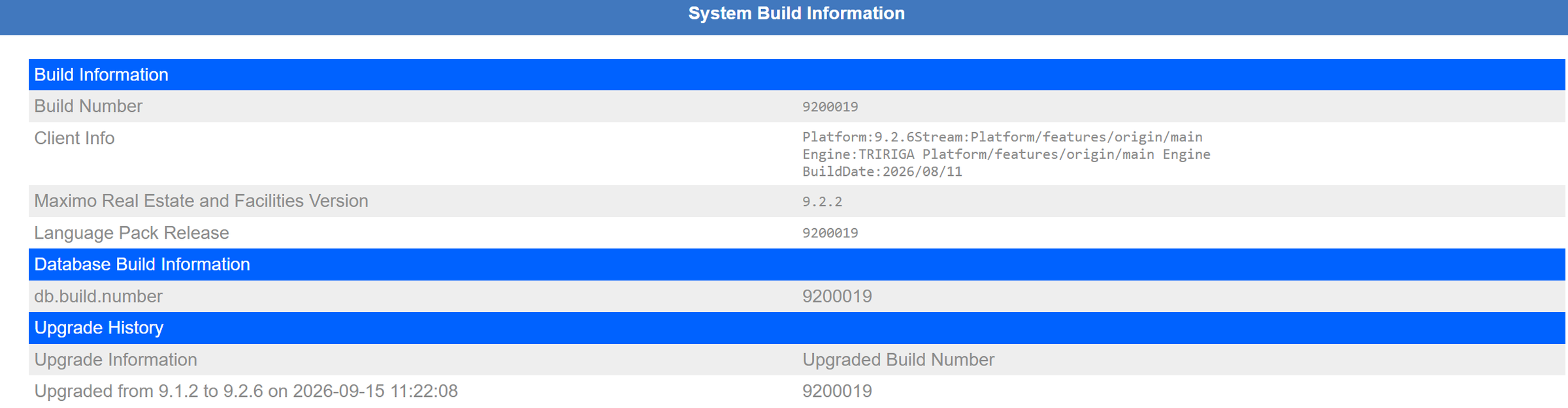
The first page IBM Support asks about. Code build, database build and language pack should all match.
Licenses

On MAS, who gets which licence (and AppPoints) is decided in Suite Administration; this page only shows what each licence type unlocks.
Admin Users
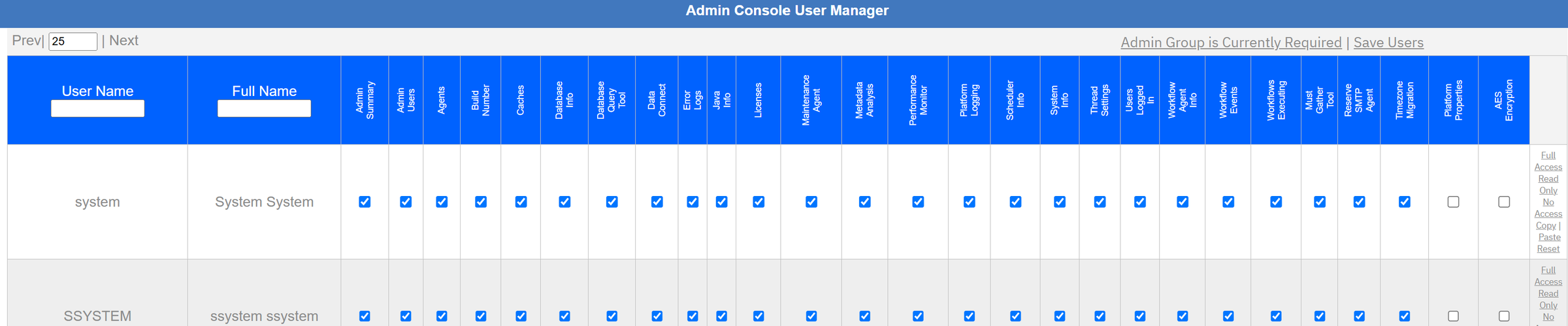
Two pages, Platform Properties and AES Encryption, are not ticked even for system: they are hidden from the menu
until someone grants them. Keep it that way unless you need them.
Users Logged In
Lists active sessions (user, IP address, login time, last action) with a "Log Out User" action. Use it before locking the system or deploying a migration package. (No screenshot: it shows session identifiers.)
Before you clickSafe, careful and dangerous buttons
| Safe any time | Careful: tell people, pick the time | Leave alone unless you know why |
|---|---|---|
| Reading any page Database Query Tool (SELECT only) Flushing one specific cache Workflow Events statistics Performance Monitor |
Agents Stop/Start All Caches (Global) Database Admin Tasks, Deep Cleanup Metadata Analysis runs Debug categories in Platform Logging Lock System |
Force Garbage Collection Editing property files in a pod Thread Settings in a pod (lost on restart) Delete future actions / DataConnect jobs Platform Properties, AES Encryption pages |
GlossaryWords you will hear
- Agent
- A background worker inside a Liberty server that polls a queue and does the work. Maximo: a cron task instance.
- Instance ID
- Number of a server in the cluster: 0 for the UI pod, 3000 for multiagents here.
- Multiagents pod
- The MAS pod that runs the agents and serves no users.
- FacilitiesWorkspace
- The OpenShift custom resource the operator reads to build MREF. Where settings really live.
- FACILITIES.properties
- The TRIRIGA properties (threads, cleanup hour, workflow recording), delivered as a secret.
- Vault secret
- The secret holding the password for MREF's AES encryption keystore.
- Workflow event
- A queued request to run an asynchronous workflow (table WF_EVENT).
- Future action
- A workflow action waiting for a date (table WF_EVENT_FUTURE).
- Cache flush
- Throwing away in-memory metadata so it is reloaded from the database.
- Must Gather
- A diagnostics package for IBM Support.
Screens: IBM Maximo Real Estate and Facilities 9.2.2 (platform 9.2.6) on Maximo Application Suite and Red Hat OpenShift, test system, viewed read-only. Agent descriptions summarise IBM's documentation and what this system shows; check IBM's documentation for your version before changing anything.