IBM Maximo Real Estate and Facilities · Class Loader · A guide for Maximo people
The MREF Class Loader: your own code and pages, without rebuilding anything
Sooner or later someone asks for something MREF does not do out of the box: a custom page, a small integration, a 3D view of the portfolio. In Maximo you would reach for a customization archive and a rebuild. In Maximo Real Estate and Facilities (MREF) you upload a file into a record called a Class Loader, and the running system picks it up. This guide explains how that works, on a real example we built: MREF3D, a 3D globe of every building. It ends with MREF's built-in 3D feature, the BIM model viewer, so you know which one to use when.
- What a Class Loader record is, and the two kinds of file it holds: Java and Web.
- Where the files really live (the database), and why that matters on OpenShift.
- The two URLs every Class Loader gives you, one for pages and one for code.
- How MREF3D is built: a web page plus one small Java class, both in one Class Loader, giving a live dashboard on an Esri 3D map: space capacity, leases, capital projects, maintenance, energy and costs per building.
- The traps:
jakartavsjavax, Parent First vs Parent Last, Development Mode, and updates that do not seem to apply. - How the built-in BIM 3D Model tab differs, and what it needs to work.
Reading time: about 15 minutes. Companion guides: your first MREF app and the Admin Console, page by page.
| In Maximo | In MREF |
|---|---|
| Customization archive (a zip of classes, built into the image) | Class Loader record with Java resource files, loaded while the system runs |
| Rebuild and redeploy the EAR / the Manage image | Upload a new file and save the record |
| Automation script (code stored in the database) | The same idea, but compiled Java in a jar |
| A custom servlet or a custom REST handler | A class that implements IConnect, reached at /rest/<name> |
A custom JSP or static files in maximouiweb | A Web resource file (a zip), reached at /rest/<name>/resource/… |
| BIM viewer add-on for Maximo (Forge viewer) | The 3D Model tab, built in, using Autodesk Platform Services |
Part 1What a Class Loader is
A Class Loader is a record in MREF that holds files the application server should load in addition to its own. There are two kinds of file:
- Java: a
.jarwith compiled classes. MREF can call them as a small web service, or as a custom step in a workflow. - Web: a
.zipwith HTML, JavaScript, images. MREF serves them as pages, to signed-in users only.
The name comes from Java: a class loader is the part of Java that finds and loads code. Each Class Loader record gets its own, so your jar does not mix with MREF's jars or with another extension's.
Part 2The Class Loader list
Open Tools › System Setup › System › Class Loader. You need an administrator's access.
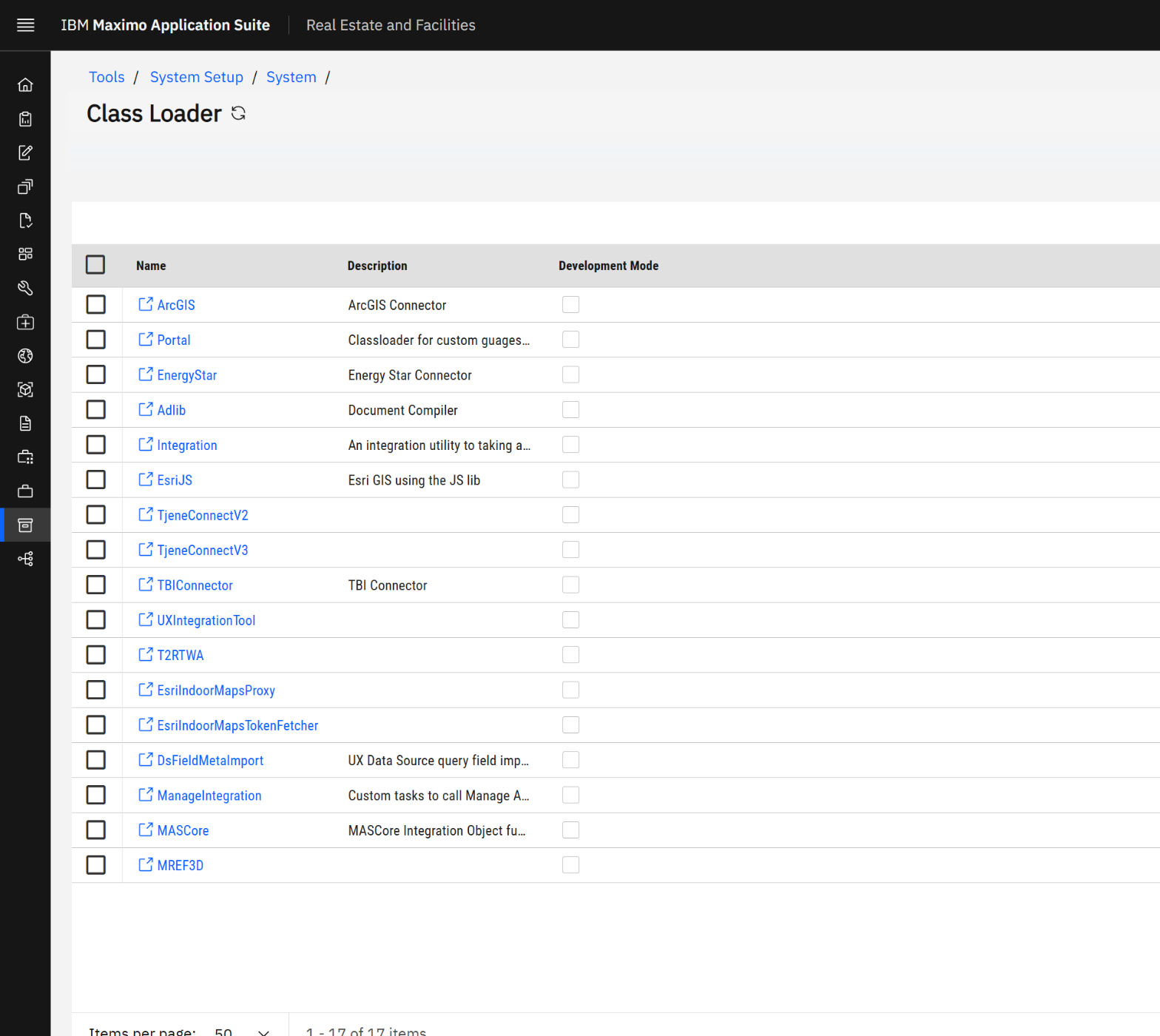
Most of the list is IBM's own. It is worth reading, because it shows what Class Loaders are used for:
| Class Loader | What it is for |
|---|---|
| EsriJS, ArcGIS, EsriIndoorMaps… | The GIS maps: Esri's JavaScript pages (Web) and the code that feeds them (Java). |
| Portal | Custom gauges on home pages. |
| EnergyStar, TBIConnector, Adlib | Connectors to outside services: energy ratings, building insights, document compilation. |
| Integration, UXIntegrationTool, DsFieldMetaImport | Admin utilities. |
| ManageIntegration, MASCore | The link to Maximo Manage and to the MAS suite: custom workflow tasks that call them. |
| TjeneConnectV2 / V3 | A third-party reporting extension. |
| MREF3D | Ours: the Portfolio 3D page and its live data. |
IBM extends MREF with the same mechanism you will use. A Class Loader is not a hack; it is the supported way to add code and pages.
Part 3Inside one record: MREF3D
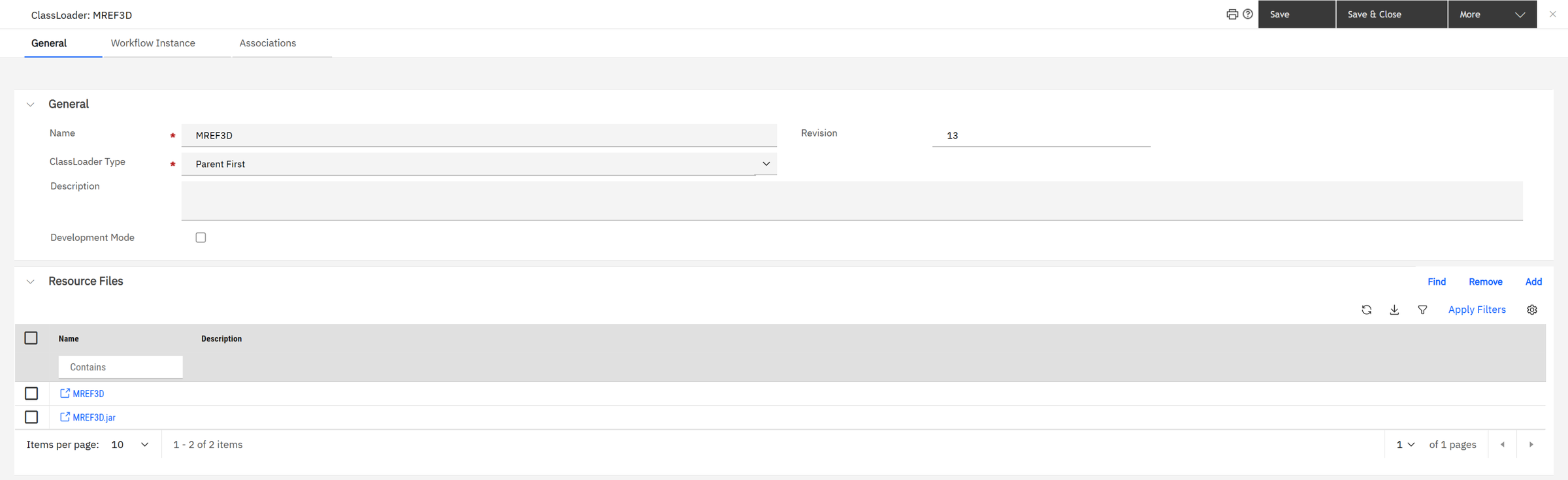
| Field | What it means |
|---|---|
| Name | The identity of the extension. It is part of every URL, and for a web service it must match the Java class name. Choose it once; do not rename. |
| ClassLoader Type | Parent First: Java looks in MREF's own libraries first, then in your jar. Parent Last: your jar first. Keep Parent First unless you ship a library in a different version from MREF's. |
| Development Mode | When ticked, MREF reloads your classes on every call. Handy while developing, slow in production. Leave it off. |
| Revision | Goes up each time the record is saved. Ours is at 13: thirteen uploads while we built it. |
| Resource Files | The files themselves. Each one is its own small record with a type (Java or Web) and the uploaded file. |
MREF3D holds two resource files: MREF3D (the Web zip with the page) and MREF3D.jar (the Java
class). One Class Loader can hold both kinds, and that is the normal design: the page and the code it calls travel together.
Part 4Where the files live
This is the part that surprises people. The uploaded file is stored in the database, as a blob. The copy on the application server's disk is only a cache: MREF unpacks it from the database the first time the Class Loader is used.
/home/wiotp/userfiles/ClassLoader/
├── EsriJS/
│   ├── Java/   EsriJS.jar, TRIRIGAIntegration.jar
│   └── Web/    EsriJS_arcgis.js, language files, …
├── MREF3D/
│   ├── Java/   MREF3D.jar
│   └── Web/    index.html, app.js, config.json, sample.json, enrich.json
└── TjeneConnectV3/
That is the real folder on our application server pod. Notice two things. The list has 17 Class Loaders, but only
three folders exist: the ones somebody has used since the pod started. And the split is always the same:
Java/ for jars, Web/ for the unpacked zip.
In MAS, pods are replaceable: anything written on a pod's disk is lost when it restarts. Maximo Manage solves that by baking customizations into the image at build time. MREF solves it by keeping the files in the database and unpacking them again on demand. The result for you: a Class Loader survives restarts, upgrades of the pod, and a database backup and restore carries it to another system.
A change made directly in userfiles/ClassLoader works for a while, then disappears: MREF writes the
database copy over it. Always change the resource file in the record.
Part 5The two URLs
Every Class Loader answers on two addresses, both under /html/en/default/rest/:
| URL | What answers | For MREF3D |
|---|---|---|
/rest/<Name>/resource/<file> | A file from the Web zip | /rest/MREF3D/resource/index.html |
/rest/<Name> | The Java class com.tririga.custom.<Name> | /rest/MREF3D?building=10336477 |
Both are served only to a signed-in user. Open either one without a session and MREF sends you to the login page. That is why a page delivered this way can call MREF's own data services with the viewer's session, and each person sees only what their security groups allow.
Part 6The web part: Portfolio 3D
The Web zip contains an ordinary web page: index.html, app.js and a few data files. It draws
every building that has a latitude and longitude on an Esri 3D globe.
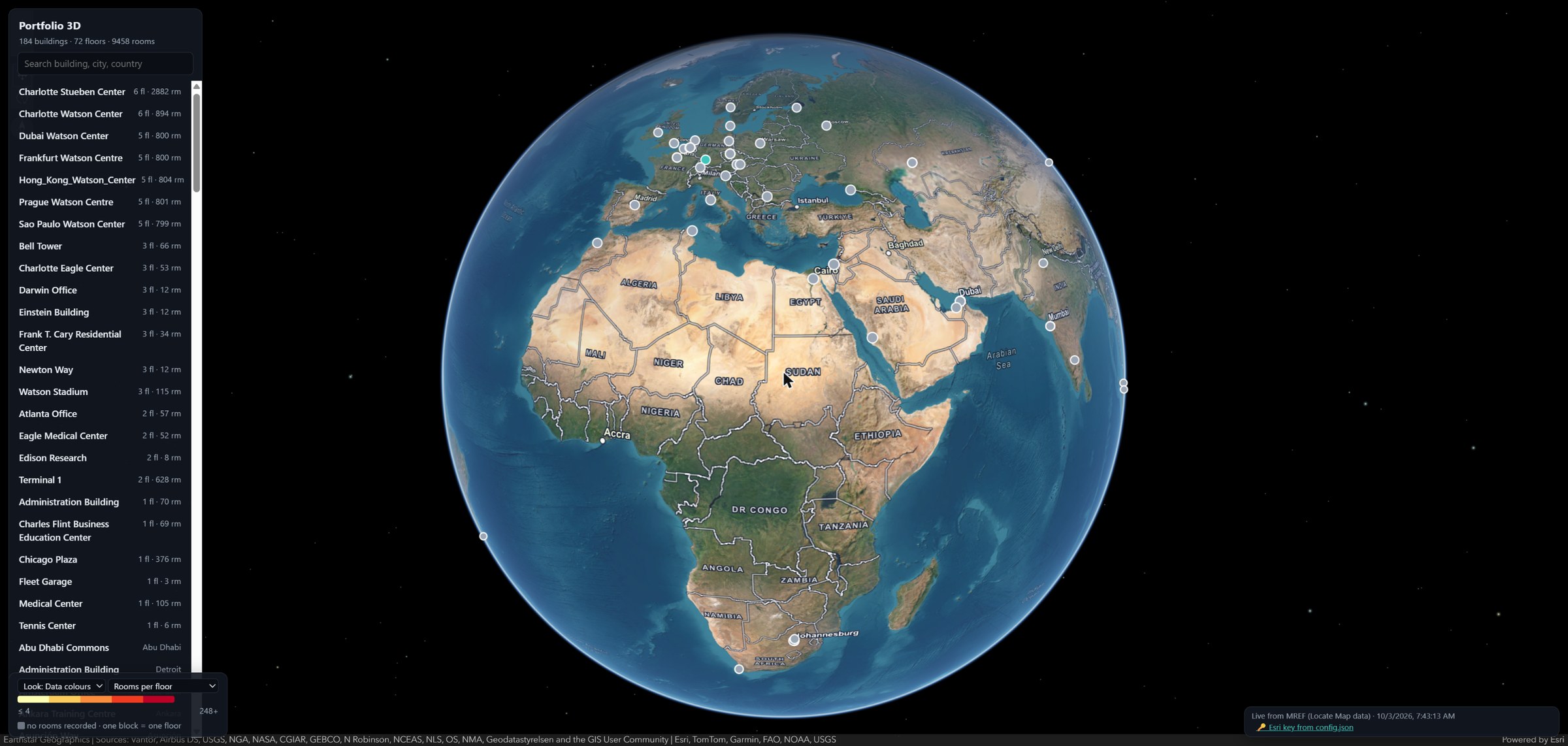
The data is not copied into the page. The page asks MREF for it, with the same data sources the built-in Locate Map application uses: one for buildings with their coordinates, one for rooms with their floor and capacity. If that request is refused, the page falls back to a snapshot file and says so in amber, so nobody mistakes old data for live data.
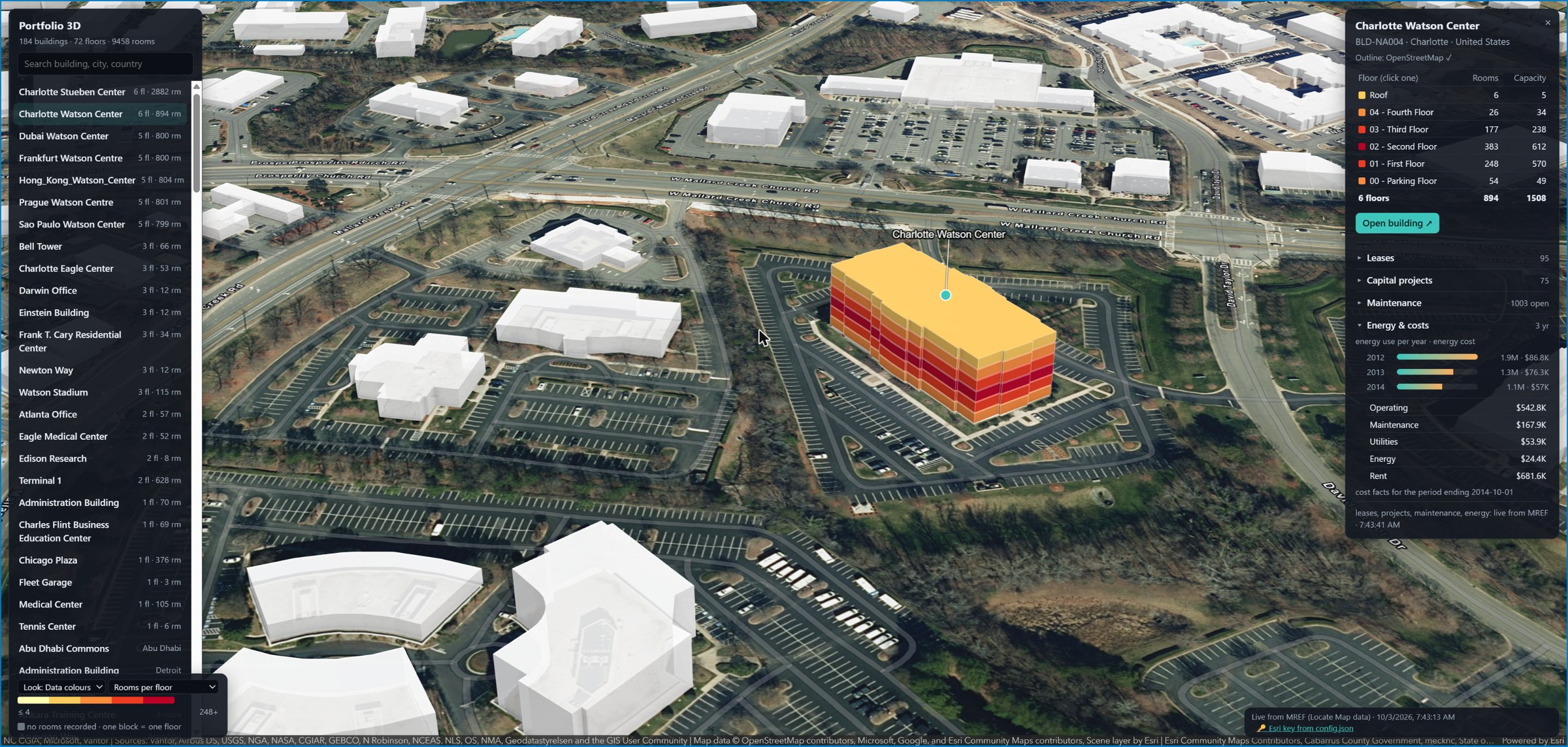
Pick a building and the page flies to it. The building is drawn as a stack of floors, coloured by the number of rooms or the capacity of each floor. The panel on the right lists the floors (6 floors, 894 rooms, capacity 1,508) and then four sections: leases, capital projects, maintenance, energy and costs. Those four come from the Java part.
A live dashboard on the map
This is the point of the whole exercise. The map is not a picture of the portfolio; it is a live dashboard built on top of a Class Loader. Everything in the right-hand panel is read from MREF at the moment you click the building, with your own session, and the last line of the panel says when.

| Section | What it tells you | For Charlotte Watson Center |
|---|---|---|
| Floors: rooms and capacity | How much space each floor holds. The blocks on the map are coloured by rooms per floor or by capacity (seats) per floor; click a floor to highlight it. | 6 floors, 894 rooms, 1,508 seats. The second floor is the densest: 383 rooms, 612 seats. |
| Leases | Every lease on the building, its floors and its spaces: type, status and expiry date, soonest first. | 95 leases |
| Capital projects | Projects on the building with status, dates and budget. | 75 projects |
| Maintenance | Work tasks counted by status, the actual cost, and the open tasks with type and due date. | 1,003 open: 871 planned, 125 active; 391 completed |
| Energy & costs | Energy use and energy cost per year, then the latest cost period: operating, maintenance, utilities, energy, rent. | Energy use down from 1.9M in 2012 to 1.1M in 2014; rent $340.8K and operating $271.4K in the latest period |
The floors show rooms and capacity: how many seats exist. They do not show how many people actually sit there. Occupancy needs the people-to-space allocations, which is the subject of the space planning post, and would be a natural next section for this dashboard.
Think of a Maximo Work Center or a start-centre with KPI portlets, but arranged on a map: one click on a location and you see its contracts, its projects, its work orders and its costs together. In Maximo you would assemble that from several applications; here one small Class Loader does it.
To put the page on a home page: Tools › Application Builder › Portal Builder, add a Portal Section of type
External URL pointing to /html/en/default/rest/MREF3D/resource/index.html, then add that section to a portal.
It is the same kind of section as the built-in GIS map sections.
Part 7The Java part: live data for one building
The page needs figures that no ready-made data source gives in one call: this building's leases, projects, work tasks, energy per year and latest costs. So the jar contains one class that reads them and returns JSON.
package com.tririga.custom;                 // required package

public class MREF3D implements IConnect {   // class name = Class Loader name

    public void execute(TririgaWS tws, HttpServletRequest req, HttpServletResponse res) {
        String b = req.getParameter("building");
        if (b == null || !b.matches("\\d{1,19}")) { res.setStatus(400); return; }   // validate input
        // read-only SELECTs on MREF's own data source, the id bound as a parameter
        // … write JSON to res
    }
}
Three rules make it work:
- The class implements
IConnect, MREF's interface for "a class that answers a web request". - It lives in the package
com.tririga.customand has the same name as the Class Loader. That is how/rest/MREF3Dfinds it. - It is compiled against the server's own libraries: MREF's
ibm-tririga.jarand the Jakarta Servlet API, for the server's Java version (Java 21 on our system).
Called as /html/en/default/rest/MREF3D?building=10336477, it answers:
{ "building": 10336477,
  "leases":   [ 95 leases:  id, name, status, type, annual rent, expiry ],
  "projects": [ 75 capital projects: status, budget, committed, dates ],
  "energy":   [ {"year":2012,"use":1902824,"cost":86845},
                {"year":2013,"use":1333385,"cost":76302},
                {"year":2014,"use":1060894,"cost":57000} ],
  "costs":    { "period":"2014-10-01", "operating":271388, "maintenance":83956,
                "utilities":26929, "energy":12187, "rent":340819 },
  "maintenance": { "counts":[ Planned 871, Completed 391, Active 125, Closed 9 ], … },
"asOf": "2026-10-03T04:44:46Z" }A class in a Class Loader can reach the database and everything the server can reach. Treat an upload like a code deployment: review it, keep the source in version control, and keep it small. Ours only reads (SELECT), binds the building id as a parameter instead of pasting it into the SQL, caps every list, and rejects anything that is not a number.
If you have written an automation script behind a Maximo REST API endpoint, this is the same pattern: a small piece of server code that answers one question as JSON. The differences are that it is compiled Java, and that it queries the database directly, so you are responsible for not exposing more than the user should see.
Part 8Six traps
| Symptom | Cause | What to do |
|---|---|---|
HTTP 500 and AbstractMethodError on IConnect.execute | The jar was compiled against javax.servlet. MREF on MAS runs on Liberty with Jakarta EE, where the package is jakarta.servlet. | Recompile against the server's Jakarta Servlet API. Old TRIRIGA extensions need this before they work on MREF. |
/rest/<Name> returns an error instead of your answer | Package or class name does not match. | Package com.tririga.custom, class name exactly the Class Loader name, same capitals. |
| A new zip is uploaded but the old page still shows | The browser cached the old files. | Hard refresh. If you change the page often, add a version to the script URL. |
| A new jar is uploaded but the old code still answers | The old class is still loaded in memory. | Save the record again so the Revision goes up. While you iterate, tick Development Mode. If the old code still answers, restart the application server at a quiet moment. |
| A manual fix on the server disappears | The disk is a cache of the database copy. | Change the resource file in the record. |
| A page loads but the map or script is blocked | The page loads something over http while MREF is on https. | Use https everywhere. IBM's own EsriJS page had this problem on our system. |
Part 9The built-in 3D: the BIM model viewer
MREF also has a 3D feature of its own, and it is a different thing. A building record has a 3D Model tab that shows the building's real geometry: the walls, rooms and equipment from the architect's BIM model (Building Information Model, usually made in Autodesk Revit).
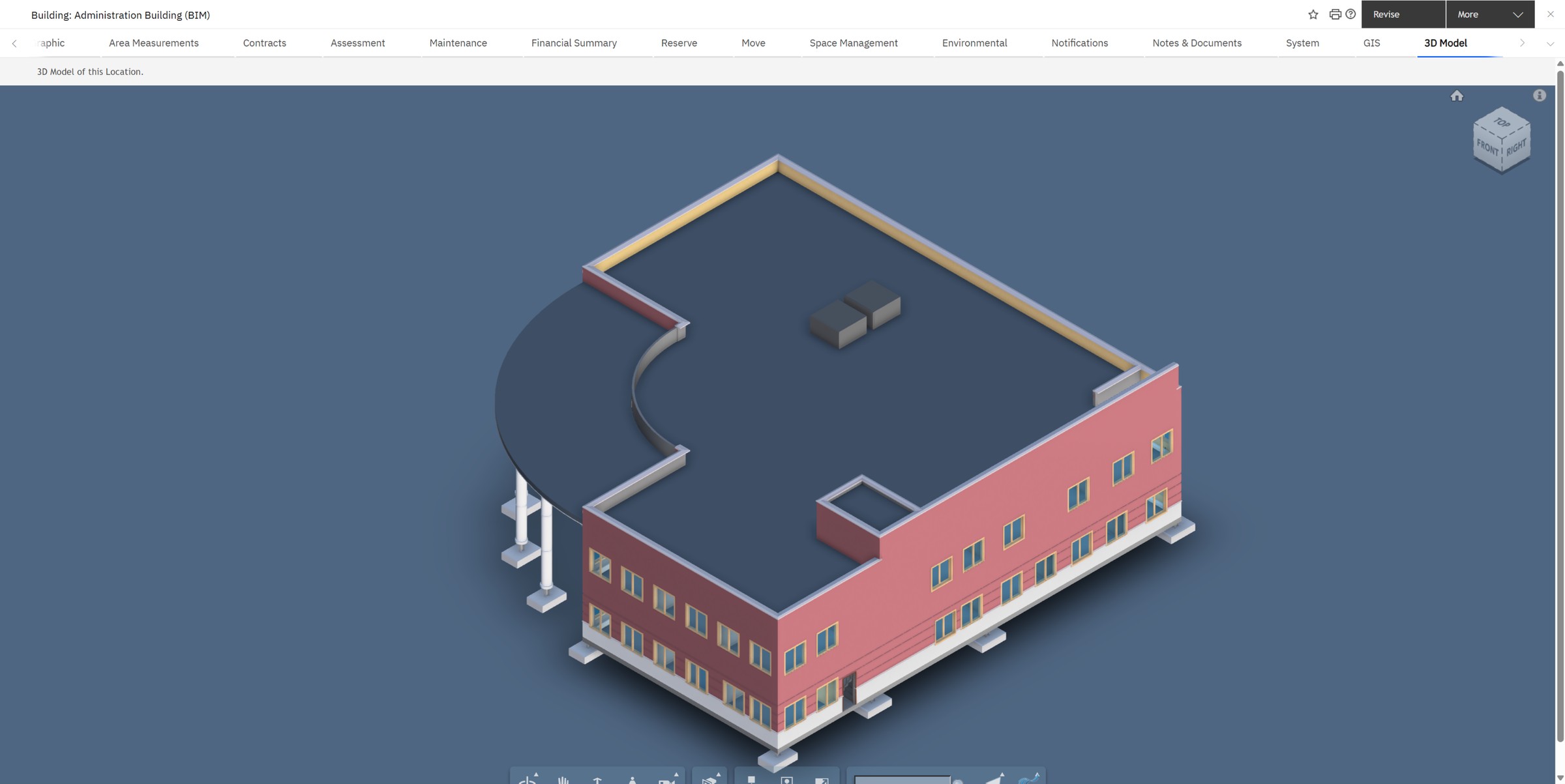
| Portfolio 3D (our Class Loader) | 3D Model tab (built in) | |
|---|---|---|
| Shows | Every building on a globe, as stacked floors | One building's real model: rooms, walls, equipment |
| Needs | Latitude and longitude on the building | A BIM model uploaded and linked to the building |
| Delivered as | A Class Loader (Web zip + jar) | A web application shipped with MREF |
| Outside service | Esri maps | Autodesk Platform Services (formerly Forge) |
| Good for | Portfolio overview, executives | Facility and space managers working inside one building |
The BIM viewer needs three things, and a new admin usually misses the first:
- An Autodesk key. The viewer is Autodesk's, and the model is translated and stored in Autodesk's cloud. The key (a client ID and secret from an Autodesk Platform Services application) goes in Tools › System Setup › BIM Connector.
- A model linked to the building. In BIM Model Management you upload the Revit file and link it to the building record. The 3D Model tab simply lists the active model links of that building.
- Rooms that match. A room in the model is tied to an MREF space by the Revit unique ID stored on the space record. With that link, clicking a room in 3D opens its space record, and the reverse.
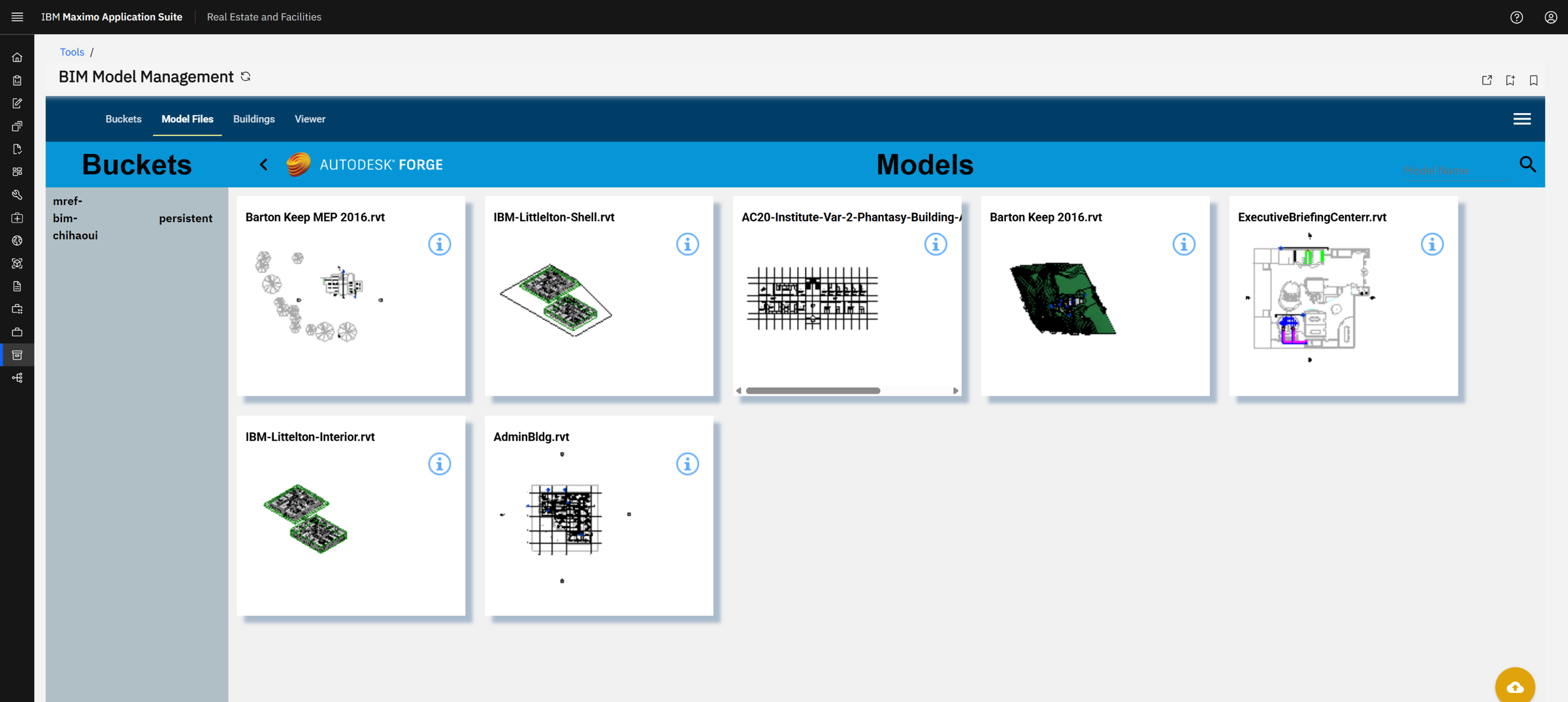
BIM Model Management has four tabs that follow the order of the work: Buckets (the storage folder in Autodesk's cloud, created once), Model Files (upload a Revit file; Autodesk translates it for the viewer), Buildings (link a model to an MREF building) and Viewer (check the result).
A key typed in BIM Model Management is kept only for your current session and is gone when you sign out. The one the 3D Model tab uses is the one saved in BIM Connector. If the tab opens but stays empty, and the browser console says "Auth request error", the saved key is missing or no longer accepted by Autodesk. Also, a model can only be read with the key of the Autodesk account that uploaded it: IBM's demo models cannot be opened with your key.
Maximo has the same idea as an add-on: the BIM viewer for Maximo, also built on Autodesk's viewer, linking model elements to assets and locations. In MREF it is part of the product, and the link is from model rooms to spaces.
Check yourself
1. You upload a new jar and restart nothing. The pod is replaced overnight. Is your extension still there in the morning?
Yes. The file is in the database; the new pod unpacks it again the first time it is used.
2. Your class is com.acme.Report in a Class Loader named Reports. Why does /rest/Reports fail?
For a web service, the class must be com.tririga.custom.Reports: fixed package, and the class named like the Class Loader.
3. An extension from an old TRIRIGA system returns HTTP 500 on MREF. What is the first thing to check?
Whether it was compiled against javax.servlet. MREF's server uses jakarta.servlet.
4. When would you choose Parent Last?
When your jar brings its own version of a library that MREF also contains, and your code needs your version.
5. The 3D Model tab is empty. Is that a Class Loader problem?
No. The BIM viewer is a built-in web application. Check the Autodesk key in BIM Connector and the model link on the building.
Glossary
- Class Loader
- An MREF record holding extra Java and Web files that the server loads while running.
- Resource file
- One uploaded file in a Class Loader: a jar (Java) or a zip (Web).
- IConnect
- The MREF interface a class implements to answer a web request at
/rest/<Name>. - Parent First / Parent Last
- Whether Java looks in MREF's libraries or in your jar first.
- Development Mode
- Reload the classes on every call; for development only.
- Jakarta
- The current name of Java's enterprise APIs; packages start with
jakarta.instead ofjavax. - Portal section
- A block on an MREF home page; one of type External URL can show a Class Loader page.
- BIM
- Building Information Model: the architect's 3D model with data on every room and element.
- Autodesk Platform Services
- Autodesk's cloud (formerly Forge) that stores and displays BIM models in the browser.
- BIM Connector
- The MREF setup record that holds the Autodesk key used by the 3D Model tab.
Want a custom page or a 3D view on your own MREF? Send me a message and I'll show you how we built this one.
Screens: IBM Maximo Real Estate and Facilities on IBM Maximo Application Suite, with IBM's GreenPoint demo data. MREF3D / Portfolio 3D is our own extension, not an IBM product. All names, amounts and dates are demo values.